Ready for Distribution in App Store Connect: Why It's Not Live
Ready for Distribution means Apple approved your app and it can be published. Every status, whether it's visible, and a checklist for when it isn't on the store.

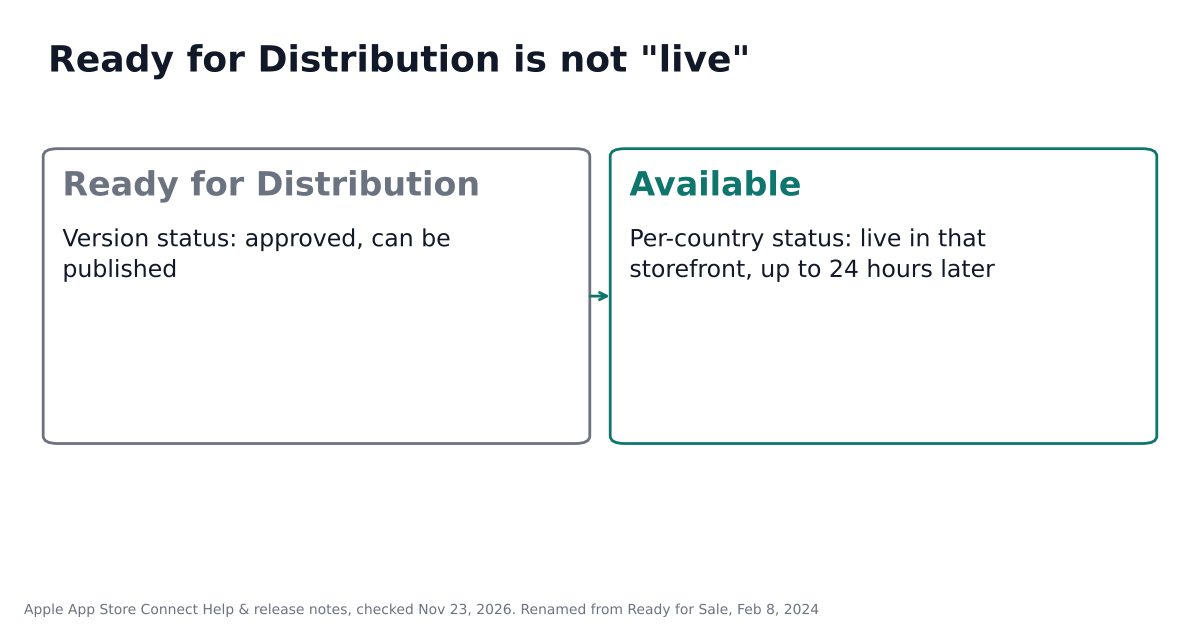
Ready for Distribution means Apple approved this version and it can be published. It is the status Apple called Ready for Sale until February 8, 2024. It does not, on its own, tell you the app is live anywhere. The per-country App Store status under Pricing and Availability does that, and Apple allows up to 24 hours after release for the app to show up.
So if the version page is green and you can’t find the app, check three things in this order: the release option, the per-country status, and your agreements. The rest of this page covers each status, a checklist for the not-showing case, and when Apple support is the only fix.
I’ve shipped my own apps, and on a first launch the green dot can arrive before the store listing does.
Ready for Sale vs Ready for Distribution
They are the same stage with a different name. Apple’s App Store Connect release note of February 8, 2024 did two things at once. It renamed Ready for Sale to Ready for Distribution, redefined it as “your app can be published,” and sent developers to Pricing and Availability to see whether the app is actually on the store. It also retired three app statuses: Developer Removed from Sale, Removed from Sale, and Pending Agreement.
The second change matters more than the rename. Before 2024, an agreement problem had its own app status. Now there’s no Pending Agreement row, and Apple’s status reference instead puts the condition inside the Ready for Distribution definition: the app is approved, but your agreements have to be in effect before it distributes. A green status with a lapsed or unsigned agreement looks exactly like a green status that’s fine.
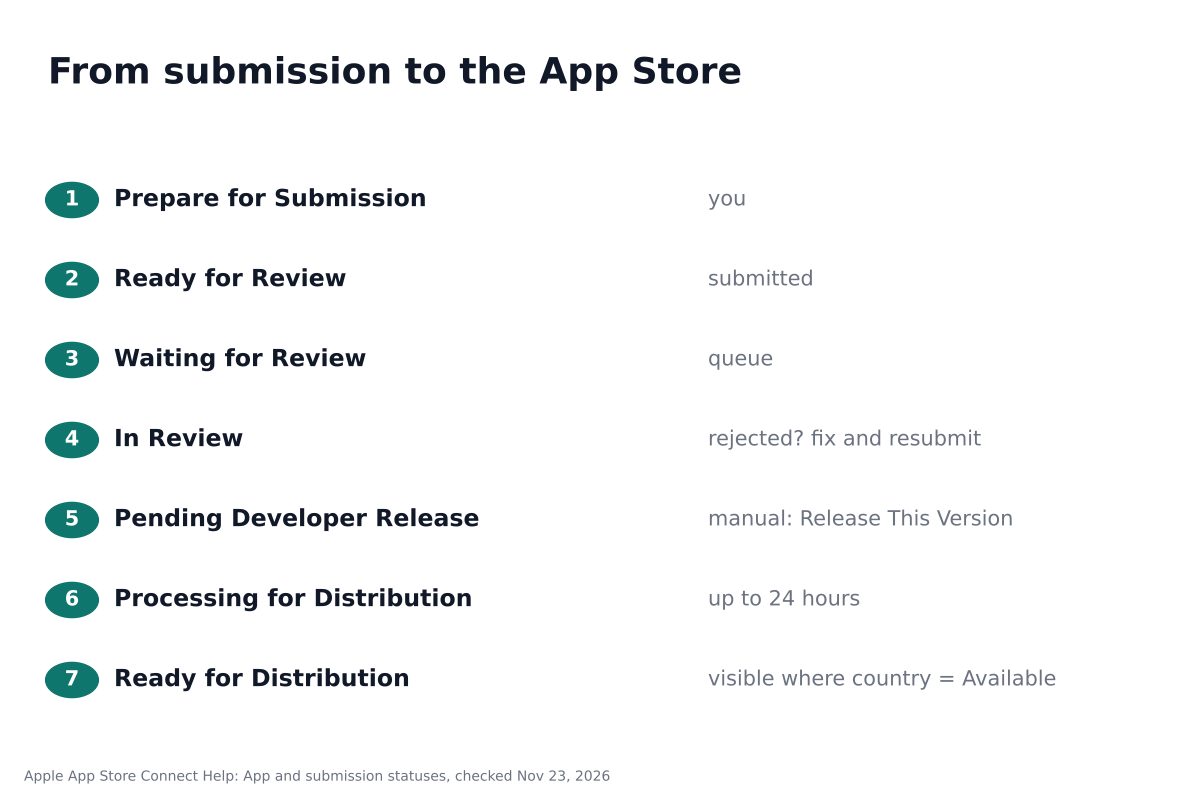
If you’re waiting for the status to change to Ready for Sale, it won’t. Ready for Distribution is the last app status in the normal path.
Every App Store Connect status, and whether your app is visible
Apple’s reference page defines each status but doesn’t say whether customers can see the app at that point, or what you should do. This table adds both. The “Visible?” column describes the version you submitted.
| Status | What it means | Visible on the App Store? | Your action |
|---|---|---|---|
| Prepare for Submission | App record exists, setup unfinished | No | Finish metadata, pricing, availability, build |
| Ready for Review | Everything entered, not yet submitted | No | Submit for review |
| Waiting for Review | Apple has the submission, review not started | No | Wait; screenshots are locked |
| In Review | A reviewer is on it | No | Wait |
| Invalid Binary | Build fails current binary requirements | No | Upload or select a compliant build |
| Accepted | One item passed, another in the same submission was rejected | No | Fix or remove the rejected item |
| Rejected / Metadata Rejected | App Review turned it down | No | Read the App Review message, fix, resubmit or reply |
| Developer Rejected | You pulled it from review | No | Resubmit when ready |
| Waiting for Export Compliance | Your CCATS file is with Apple | No | Wait |
| Pending Developer Release | Approved; you chose manual release | No | Click Release This Version |
| Pending Apple Release | Held until a matching OS version ships | No | Wait, or check your deployment target |
| Processing for Distribution | Apple is processing the release | Not yet; up to 24 hours | Wait 24 hours |
| Ready for Distribution | Approved and publishable; agreements must be in effect | Yes, where the country status reads Available | Check the per-country status |
| Ready for Distribution, Phased Release | Update rolling out to automatic updaters over 7 days | Yes; anyone can update manually | Nothing, or Release to All Users |
Source: Apple App Store Connect Help (App and submission statuses; release option; phased release), collected November 23, 2026.
Read it this way: only the last two rows can put the version in front of customers, and even they depend on the next section.
Where to see if it’s actually live
Open your app, go to Pricing and Availability, find App Availability, and click Manage. You get one App Store status per country or region. That list answers “is it live?” far more precisely than the green dot.
| Country status | What it tells you | Fix |
|---|---|---|
| Available | Live in that storefront | None |
| Available on App Release | Waits for your manual release or scheduled date (never-released apps only) | Release, or wait for the date |
| Processing to Available | Going live, normally within 24 hours | Contact Apple after 24 hours |
| Not Available | You didn’t select this country | Add it under Manage Availability |
| Missing App Rating | No age rating set | Complete the age rating |
| Missing Tax Form | Brazil only: Brazilian tax info missing | Submit the Brazil tax form |
| Pre-Order Pending Developer Release | Pre-order waits for your first release | Release the version |
| Cannot Sell App | Blocked for another reason | Hover the status for the reason |
Source: Apple App Store Connect Help, App Store availability statuses, collected November 23, 2026.
Availability changes take effect immediately but can need up to 24 hours to reach every user. A new app set to All Countries or Regions goes out to all 175 storefronts once it’s Ready for Distribution.
One trap: the App Store you browse is the one tied to your Apple Account’s country. If you limited the app to the US and Canada and your account is in the UK, you won’t find it, and nothing is wrong.
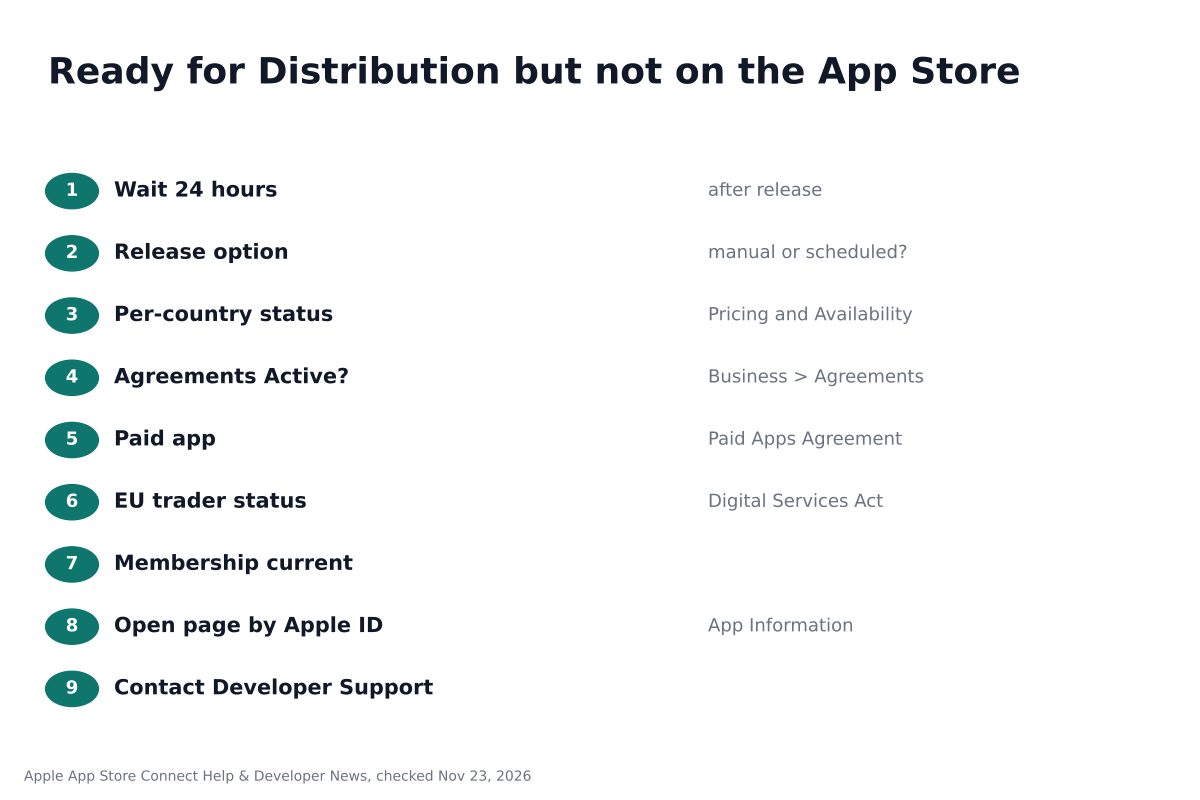
Not showing after Ready for Distribution: the checklist
Work through these in order. Each step either clears the problem or rules out one cause.
- Check the clock. Has it been 24 hours since release? Apple’s stated window is up to 24 hours. Before then, waiting is the fix.
- Check the release option. On the version page, see whether you chose manual release, automatic release, or automatic release no earlier than a date. Manual means you still have to click Release This Version. A future date means it goes out then.
- Open the per-country status. Pricing and Availability > App Availability > Manage. Find your own country in the list.
- Check agreements. Business > Agreements. Apple’s status reference says agreements must be in effect for the app to distribute, and only the Account Holder can accept a new version.
- For a paid app, check the price. Without the latest Paid Apps Agreement accepted, Apple says you can only offer the app for free.
- Check EU trader status. Since February 17, 2025, apps without trader status are removed from the EU App Store until it’s provided and verified. Every developer has to declare one, even outside the EU.
- Check your membership. If it expired, your apps can’t be downloaded.
- Open the product page directly. The app’s Apple ID, shown under App Information, is the number in its desktop App Store URL. If that page loads, the app is published, and only search is lagging.
- Contact Apple Developer Support if every check passes and 24 hours have gone by.
Manual and scheduled release
With manual release, an approved version sits in Pending Developer Release, and Apple sends a reminder email after 30 days. Clicking Release This Version and confirming starts the up-to-24-hour clock. The version page also offers Cancel This Release if you change your mind.
The scheduled option is easy to forget a week later. If you picked “automatically release this version after App Review, no earlier than” a date, Apple won’t publish before that date and time, and the countries show Available on App Release until then. Release dates also land at different times by storefront; Apple’s start-time reference lists them in your browser’s time zone and in UTC.
Paid apps and agreements
A first paid app is where agreement problems show up, because the Free Apps Agreement covers free apps and the Paid Applications Agreement covers paid apps and In-App Purchases. If the Paid Apps row isn’t Active, fix that first; Paid Apps Agreement statuses walks through every status and the tax-then-bank order.
Apple’s pages disagree on where this agreement lives. The Set a price page still says “Tax and Banking”, while the status reference and the agreements page say Business > Agreements. Business is the current name, so look there. For a US developer, the tax form in that flow is the W-9; the IRS explains the W-9’s purpose, and this is not tax advice.
While you’re in Business for a paid app, check the App Store Small Business Program. Its commission is 15% on paid apps and In-App Purchases, and developers new to the App Store qualify, as do those with up to $1 million in prior-calendar-year proceeds.
EU trader status
If the app is live in the US but missing in Germany or France, look at the Digital Services Act section in App Store Connect before anything else. Apple says it can’t make the trader call for you; you self-assess under EU law and declare. Account-level declarations need the Account Holder or an Admin.
Search versus the direct link
Apple says your app is searchable by app name, subtitle, keywords, and company name. It does not publish how long a brand-new app takes to show up in search results. So test publication without search: open the product page by Apple ID, or query Apple’s own Search API with a lookup by the app’s ID and a two-letter country code. Apple limits that API to roughly 20 calls per minute. If the lookup returns your app, it’s published in that storefront, and what’s left is ranking, not a broken release.
Updates: what “Phased Release” next to the status means
For an update with 7-day phased release on, the status reads Ready for Distribution with Phased Release added after approval. The update isn’t hidden. Phasing only controls who gets it through automatic updates: 1% of those users on day 1, 2% on day 2, 5% on day 3, 10% on day 4, 20% on day 5, 50% on day 6, and everyone on day 7. Anyone can open the App Store and update manually at any point.
A worked example: your update goes out on Monday with phased release on. On Wednesday, day 3, 5% of auto-updating users have it. A user who taps Update on the product page that day gets it immediately. If a crash report comes in, pause; pauses can total up to 30 days. If the update is solid, click Release to All Users.
Pre-orders and scheduled launch dates
For a first-time pre-order, the release date has to fall between 2 and 180 days out. Set it up on November 23, 2026, and the window runs from November 25, 2026 to May 22, 2027. Manual release is required the first time: the pre-order doesn’t appear until the app is approved and you click Release This Version, then up to 24 hours more. Until you do, the countries read Pre-Order Pending Developer Release.
Apple’s pre-order page also mentions a “Pre-Order Ready for Distribution” version status that doesn’t appear in the app status table. Treat it as the pre-order flavor of Ready for Distribution; the per-country status is still what tells you it’s up.
When to contact Apple
Contact Apple Developer Support in three cases. A country has sat in Processing to Available for more than 24 hours, which Apple itself says to report. The release controls on the version page are greyed out. Or all nine checks pass and the app still isn’t Available a day after release. Include the app’s Apple ID and the exact per-country status you see.
Don’t schedule launch posts, a Product Hunt launch, or outreach until your own country reads Available. Open Pricing and Availability > Manage right now and read your country’s row; that one word tells you whether you’re waiting, fixing, or launching.
Frequently asked questions
Does Ready for Distribution mean my app is live?
Not by itself. Since February 2024, Apple uses Ready for Distribution to say a version is approved and can be published. Whether customers can download it is shown per country under Pricing and Availability. If a country reads Available, the app is live there. After a release, Apple says it can take up to 24 hours to appear on the App Store.
Is Ready for Distribution the same as Ready for Sale?
It is the same status under a new name. Apple's App Store Connect release note of February 8, 2024 renamed Ready for Sale to Ready for Distribution and said it now indicates the app can be published. The same update retired Developer Removed from Sale, Removed from Sale, and Pending Agreement as app statuses.
Why is there no Release button on my Ready for Distribution app?
Release This Version appears while a version sits in Pending Developer Release, which only happens when you chose manual release. If you picked automatic release, or automatic release no earlier than a date, there is nothing to press: Apple publishes it after approval or on that date. Check the release option on the version page to see which one you set.
Why can't I find my new app in App Store search?
First confirm the app is Available in your country under Pricing and Availability and that your device's Apple Account is in that country. Then open the product page directly using the app's Apple ID. Apple says apps are searchable by name, subtitle, keywords, and company name, but it publishes no time for a new app to start showing in search results.
How long does Apple take to put an approved app on the App Store?
Apple's help pages say up to 24 hours after release. Processing for Distribution and Processing to Available both carry the same 24-hour window, and Apple asks you to contact it if Processing to Available lasts longer than that. Availability changes by country can also take up to 24 hours to reach all users.
Sources
- App Store Connect release notes (February 8, 2024 entry)
- App Store Connect Help: App and submission statuses
- App Store Connect Help: Select an App Store version release option
- App Store Connect Help: Release a version update in phases
- App Store Connect Help: Overview of publishing your app on the App Store
- App Store Connect Help: Manage availability for your app on the App Store
- App Store Connect Help: Set a price
- App Store Connect Help: View agreements status
- App Store Connect Help: Manage EU Digital Services Act compliance information
- Apple Developer News: Apps without trader status will be removed from the App Store in the EU (Jan 16, 2025)
- Apple Developer Account Help: Membership renewal
- App Store Connect Help: App information reference
- App Store Connect Help: View and edit app information
- App Store Connect Help: Publish for pre-order
- Apple: iTunes Store Web Service Search API
- App Store Connect Help: Pricing and availability start times by country or region
- IRS: About Form W-9
- Apple Developer: App Store Small Business Program
This article is general information based on the author's experience. It is not licensed financial, legal, or tax advice. See the editorial policy.