Paid Apps Agreement Pending User Info: Every Status, Fixed
Pending User Info means Apple's Paid Apps Agreement is signed but tax or bank details are unfinished. Every status, what it blocks, the fix, and the setup order.

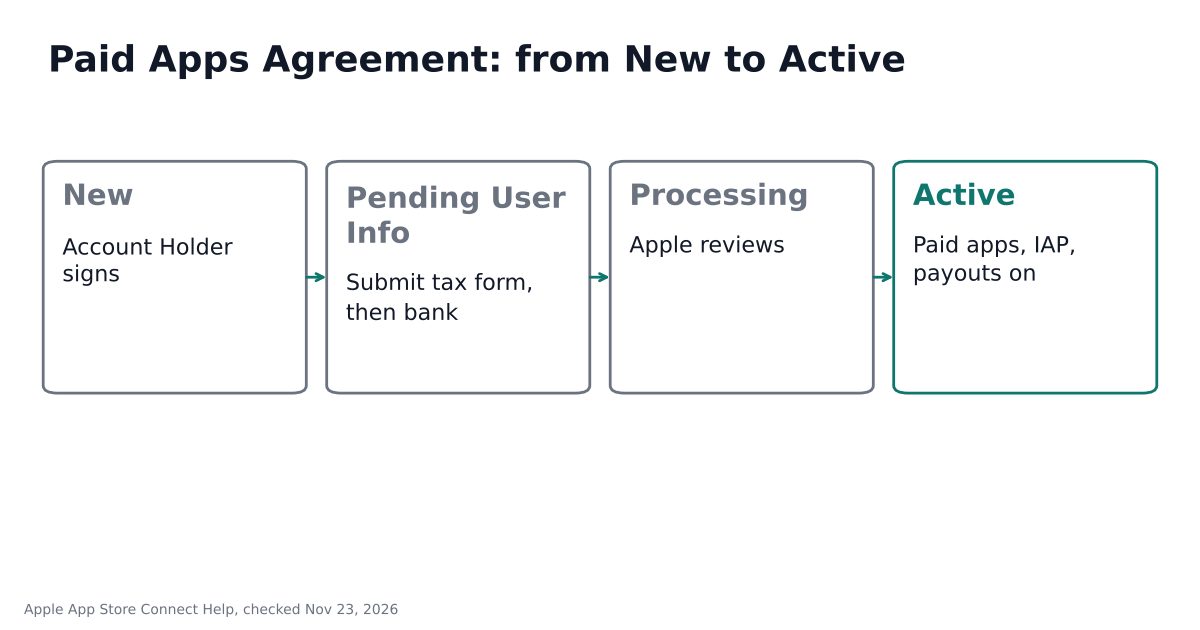
Pending User Info means you signed the Paid Apps Agreement, but it isn’t in effect yet because required information is missing: usually the US tax form, the bank account, or both. Fix it under Business > Agreements in App Store Connect: submit the tax form first, then the bank account, until both read Active. Until the agreement itself reads Active, you can’t sell paid apps or In-App Purchases, can’t test purchases in the sandbox, and won’t get paid.
I’ve shipped my own apps, and this is the screen I’d clear before the build is finished, because none of it depends on code.
This is not licensed tax or financial advice. For which taxpayer number goes on the form, the IRS page on taxpayer identification numbers is the primary source.
What each Paid Apps Agreement status means
Apple lists twelve statuses on its View agreements status page. The page defines each one but stops there. The table below adds what to do and what each status is holding up, using Apple’s pages on signing, In-App Purchases, sandbox testing, payments, and renewal.
| Status | What it means | What to do | What it blocks |
|---|---|---|---|
| New | Nobody has signed it yet | Account Holder clicks View and Agree to Terms | Paid apps, IAP, sandbox IAP, tax and bank forms, payouts |
| Pending User Info | Signed, not in effect, info missing | Finish Tax Forms and Bank Accounts until both read Active | Paid apps, IAP, sandbox IAP, payouts |
| Processing | Everything submitted, Apple is reviewing | Wait; don’t resubmit | Same as above until it turns Active |
| Verifying | Apple is reviewing extra legal entity details you sent | Wait; answer any Apple email | Not stated by Apple; treat as not in effect |
| Active | In effect | Nothing | Nothing |
| Active (Pending User) | In effect, some required info still missing | Finish the missing tax or bank item | Payouts if no bank account is on file |
| Active (New Agreement Available) | A newer version is waiting for a signature | Account Holder signs the new version | New apps and new IAP until signed |
| Pending (New Legal Entity) | Your legal entity changed; a new contract is needed | Account Holder signs the new agreement | Not stated by Apple; treat as not in effect |
| Pending (Update Legal Entity) | Your legal entity changed; new tax or bank forms are needed | Resubmit the tax and/or bank forms | Not stated by Apple; treat as not in effect |
| Pending (New Agreement Available) | A newer version replaced the one you hadn’t finished | Account Holder signs the new version, then finishes forms | Paid apps, IAP, payouts |
| Expired | The agreement ended | Renew the membership if needed, then Renew Agreement | Paid apps, IAP, payouts |
| Disabled | Apple disabled it | Provide what Apple asks for | Your app is off the App Store until Apple accepts the info |
Source: Apple App Store Connect Help and Developer Account Help pages listed below, collected November 23, 2026.
Two rows cause most of the confusion. Processing and Verifying are Apple’s turn; everything else that isn’t plain Active is yours.
Why it still says Pending User Info when everything looks done
You signed, filled in every field you could see, and the row still hasn’t moved. Apple’s own pages point to five causes, and you can check all of them in two minutes:
- The tax form was never submitted. Apple says it can’t process banking information until every required tax form for the paid contract is in. A bank account entered first just sits.
- The bank account is waiting for the Account Holder. If an Admin or Finance user added it, the Account Holder must approve it under Bank Accounts > Review Changes. Unapproved changes lapse after 30 days.
- Tax Forms or Bank Accounts doesn’t read Active. Apple’s sandbox technote treats both as complete only when each section shows Active.
- A newer agreement version appeared. The status changes to Pending (New Agreement Available) and needs a fresh signature.
- Your legal entity details changed. Name and address changes go through Apple Developer Support, not a form you can edit yourself.
If all five check out and nothing has changed, it’s no longer something you can fix from your side. Contact Apple Developer Support from the link at the bottom of any App Store Connect help page.
The setup order that avoids getting stuck
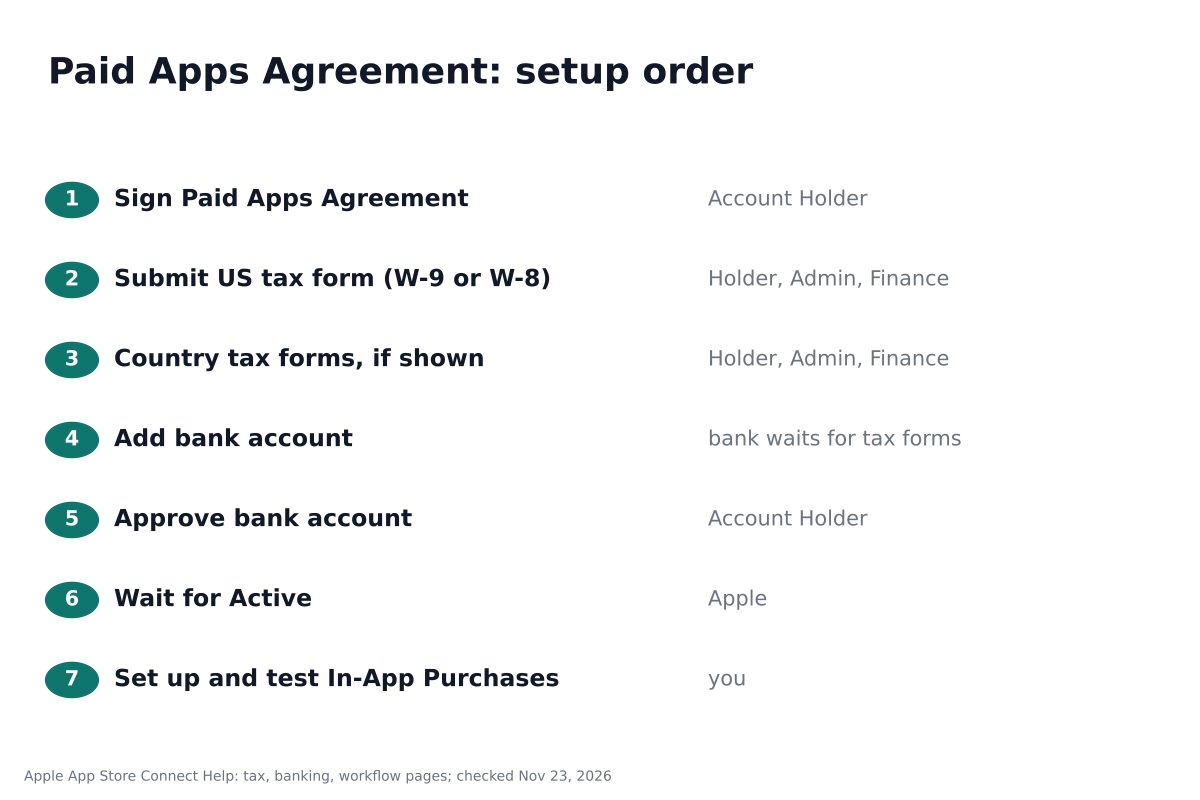
Apple’s workflow page puts the agreement first, then banking and tax, and the individual help pages show why the order matters: tax forms don’t appear until the agreement is signed, and banking can’t be processed until the tax forms are in. Here is the order as a checklist, with who can do each step:
- Account Holder signs the Paid Apps Agreement: Business > Agreements > Paid Apps row > View and Agree to Terms. You may need a two-factor code. It can’t be undone.
- Submit the US tax form under Tax Forms > Add Tax Info. Account Holder, Admin, or Finance.
- Submit any country-specific tax form App Store Connect shows you (Australia, Brazil, Canada, Ireland, and Mexico have extra ones).
- Add the bank account under Bank Accounts > Add Bank Account. Account Holder, Admin, or Finance.
- If someone other than the Account Holder added it, the Account Holder approves it.
- Wait for the agreement row to read Active.
- Then set up In-App Purchases and test them in the sandbox.
Tax forms: W-9 or W-8BEN
Every developer completes a US tax form, wherever they live. A US-based developer gets the W-9. Apple asks for a Social Security Number for an individual and an Employer Identification Number for a business entity; per the IRS, an ITIN is the number for people who can’t get an SSN. Outside the US, App Store Connect asks a few questions and routes you to the W-8BEN, W-8BEN-E, or W-8ECI.
Check the form twice before you hit Submit. Apple says you can’t change most submitted tax information in App Store Connect and has to be contacted for corrections. A correction counts for the current month’s earnings only if it’s made before the fiscal month ends.
Bank account
Enter your own bank, not an intermediary or correspondent bank. The account holder name has to match the bank’s records exactly, punctuation included, and a mismatch can get payments rejected. Include leading zeros in the account number, and don’t put an IBAN in the account number field.
Apple pays to one bank account only, with no split payments. If you’re a sole proprietor still paying app income into a personal account, set up the account you actually want first; business bank accounts for sole proprietors covers that choice.
Who can sign, and who can fill in the rest
Only the Account Holder can sign. Apple’s role page says the Account Holder is the only user who can sign legal agreements, and the Developer Account help names the Paid Applications Agreement as one of them. For a solo developer enrolled as an individual, that’s you, so the question only bites on teams.
Admin and Finance users can view agreement status and enter tax and bank details. They can’t push a bank change through on their own: adding a bank account, replacing one, or editing an IBAN waits for the Account Holder’s approval. If you’re the Account Holder and a contractor set up your banking, look for the Pending row and approve it.
Apple’s current help pages describe no separate contacts step for this agreement. If App Store Connect asks you for contact details while you’re filling it in, complete them; that’s part of the “required information” the status refers to.
How long each step takes, per Apple
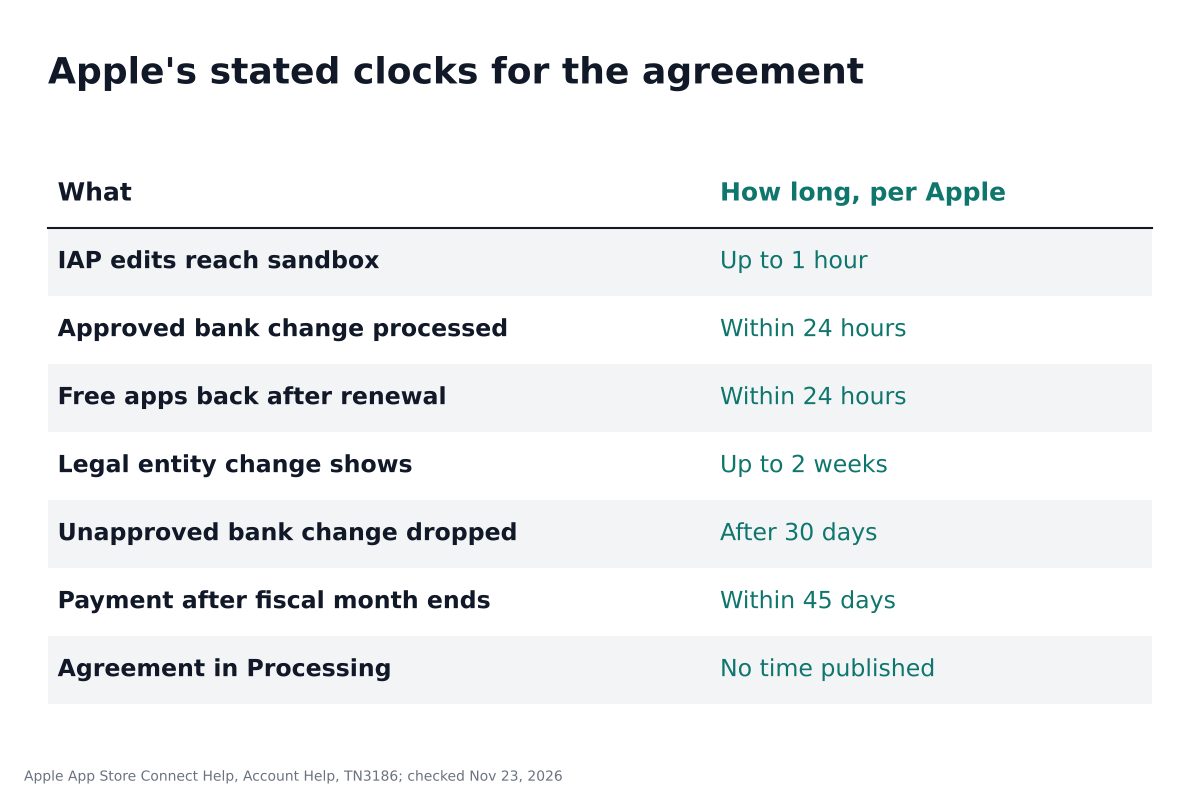
Apple doesn’t publish a turnaround for the agreement’s own Processing status. What it does publish is scattered across six pages, so here it is in one place:
| Step | Apple’s stated timing |
|---|---|
| Bank account change after Account Holder approval | Processed within 24 hours |
| Bank change not approved by the Account Holder | Dropped after 30 days |
| Bank change made after that month’s payment run started | Goes to a later payment |
| Tax form correction | Counts this month only if made before fiscal month end |
| Legal entity name or address change | Up to two weeks to show |
| IAP edits reaching the sandbox | Up to 1 hour |
| Free apps after a lapsed membership is renewed | Back within 24 hours |
| Payment once everything is Active | Within 45 days after the fiscal month ends |
| Paid Apps Agreement in Processing | No time published |
Source: Apple App Store Connect Help, Developer Account Help, and TN3186, collected November 23, 2026.
A worked example: you submit the W-9 and the bank account on the same afternoon, as the Account Holder, so no approval step applies. Count on about a day for the bank details, which is Apple’s stated time for an approved bank change. The agreement then sits in Processing for however long Apple’s review takes. If it turns Active, any sale you make from then on is paid within 45 days after its fiscal month closes. The App Store payment schedule walks through those fiscal month dates.
What a non-Active agreement does to paid apps, IAP and payouts
The rule is simple. Apple pays only when a Paid Apps Agreement is in effect and banking information is on file, and it says the agreement must be active to submit or update paid apps and In-App Purchases.
In practice that touches four things:
- Sandbox testing. Apple’s In-App Purchase setup page says the agreement must be Active to test purchases in the sandbox. An empty StoreKit product list on a device with a sandbox account is the classic symptom.
- App Review. Paid In-App Purchases won’t work in review until the agreement is active, so a reviewer can’t complete a purchase.
- Payouts. With no agreement in effect, there’s no payment.
- The Small Business Program. Enrollment requires accepting the latest Paid Apps agreement, so the App Store Small Business Program 15% rate waits on this screen too.
Lapses work differently. If your membership expires, your apps stop being available for download; after you renew, paid apps come back once you sign in and accept the Paid Applications Agreement again. Disabled is the serious one: Apple removes the app from the App Store until it accepts the information it asked for.
Once you’re Active, run your prices through the App Store fee calculator to see what each sale nets.
When to contact Apple
Contact Apple Developer Support when the status is Processing or Verifying for longer than you can afford, when all five causes above are ruled out and Pending User Info won’t move, or when you need to change your legal entity name or address.
Open App Store Connect now, go to Business > Agreements, and read the Tax Forms and Bank Accounts rows: whichever one isn’t Active is your next step.
Frequently asked questions
Why does my Paid Apps Agreement say Pending User Info after I signed it?
Signing is only the first step. Apple shows Pending User Info when the agreement is signed but not yet in effect because required information is missing, almost always the US tax form, the bank account, or both. Open Business, then the Agreements tab, and check that Tax Forms and Bank Accounts each read Active. A bank account added by an Admin or Finance user also waits for the Account Holder to approve it.
Do I need an active Paid Apps Agreement to test In-App Purchases in the sandbox?
Yes. Apple's In-App Purchase setup page says the agreement must be Active to test In-App Purchases in the sandbox, and technote TN3186 lists a missing agreement and incomplete banking or tax information as reasons products don't load. If StoreKit returns an empty product list and your agreement isn't Active, fix the agreement before you debug code.
Can I update my free apps while the Paid Apps Agreement is pending?
Free apps run under the Apple Developer Program License Agreement, not the Paid Apps Agreement, and Apple's help pages don't say a pending paid agreement blocks free updates. The exception is a new agreement version: Apple says you can't create a new app or In-App Purchase until the Account Holder accepts the latest version.
How long does Processing take for the Paid Apps Agreement?
Apple doesn't publish a time for the agreement's Processing status. It does publish two related clocks: a bank account change is processed within 24 hours after the Account Holder approves it, and approved legal entity name or address changes can take up to two weeks to show in App Store Connect.
Can an Admin sign the Paid Apps Agreement?
No. Apple says the Account Holder is the only user who can sign legal agreements, and the Paid Apps Agreement is one of them. Admin and Finance users can view agreement status and enter tax and banking information, but a bank account they add needs the Account Holder's approval before Apple processes it.
Sources
- App Store Connect Help: View agreements status
- App Store Connect Help: Sign and update agreements
- App Store Connect Help: Provide tax information
- App Store Connect Help: Enter banking information
- App Store Connect Help: Overview of receiving payments
- App Store Connect Help: Role permissions
- Apple Developer Account Help: Roles
- App Store Connect Help: Overview for configuring In-App Purchases
- Apple TN3186: Troubleshooting In-App Purchases availability in the sandbox
- Apple StoreKit: Testing In-App Purchases with sandbox
- App Review Help: Configure In-App Purchases for review in the sandbox
- Apple Developer Account Help: Membership renewal
- App Store Connect Help: App Store Connect workflow
- IRS: Taxpayer Identification Numbers (TIN)
- Apple Developer: App Store Small Business Program
- App Store Connect Help: Banking information reference
This article is general information based on the author's experience. It is not licensed financial, legal, or tax advice. See the editorial policy.