AdSense for YouTube Account Inactive? What It Means and Fixes
AdSense for YouTube association inactive, deactivated or closed? What each status does to your balance, when to reactivate or relink, and a decision checklist.

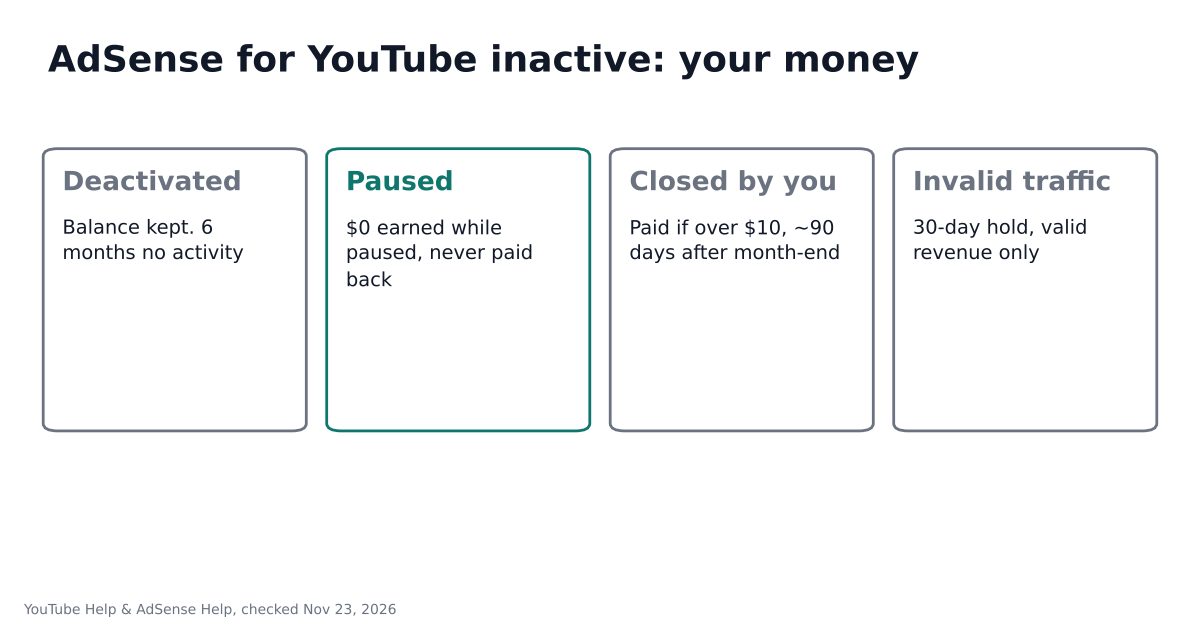
“Your AdSense for YouTube account association is inactive” means the payments account tied to your channel is no longer active and approved, so YouTube pauses monetization. The usual cause is deactivation after 6 months with no ad activity or earnings, or setup not finished within 6 months. Your balance isn’t lost. Reactivate the old account or link another one in YouTube Studio under Earn.
I grew a YouTube channel past 130,000 subscribers on my own, and this guide lines up every account status Google uses with what it does to your money. It is not licensed financial or legal advice; Google’s deactivated account page is the primary source. If your account is fine but a payment never landed, read why a YouTube AdSense payment wasn’t received instead.
What “association is inactive” usually means
There are two separate things here: the AdSense for YouTube account (the payments account) and the association (the link between that account and your channel). YouTube needs both to be live. If the account behind the link stops being active, the link stops counting, and YouTube treats the channel as if nothing were linked.
Google’s help pages don’t use the word “association” for a single status. The message lines up with one of the rows in the table below, and they are not equally serious.
Start with the most common. Google deactivates an AdSense for YouTube account when it goes 6 months without ad activity or earnings, and sends a warning email at 5 months. It does the same to accounts that were opened but never finished and linked within 6 months.
One detail rules this out for a lot of people. Accounts with earnings aren’t deactivated for inactivity. If your channel was earning right up to the day the message appeared, check the duplicate, closure and policy rows in the table below first.
Every AdSense for YouTube status and what happens to your balance
This table pulls together six Google help pages that each cover one status. The “balance” column is the part creators usually ask about first.
| What you see | What it means | Your balance | Next step |
|---|---|---|---|
| Email: account deactivated, no ad activity or earnings for 6 months | Account deactivated for inactivity; warning came at 5 months | Kept. Sign in to see it; paid out after reactivating, or after closing if over $10 | Reactivate and relink, or close to cash out |
| Email: account deactivated, setup not completed | Opened but not finished and linked within 6 months | Usually none earned yet | Reactivate, finish setup, link |
| Studio: monetization paused, needs a linked account | Link missing, account deactivated, or new account still in review | Past balance kept; nothing earned while paused, and that period is never paid | Link a working account that is approved |
| Email: you already have an existing AdSense account | New account disapproved as a duplicate of one under the same payee name | Google doesn’t say; sign in to both accounts and check | Relink the older account, or close it first and keep the new one |
| Account closed by you | You ran Close account in AdSense for YouTube; channel stops earning | Final payment within about 90 days after month-end if over $10, address verified, no holds | Sign in and reactivate (AdSense Help allows it for closed accounts) or link another account |
| Email: disabled for invalid traffic | Google closed the account over traffic it judged invalid | 30-day hold, then only revenue not judged invalid may be paid | Appeal; no new account allowed |
Source: YouTube Help and AdSense Help pages listed under Sources, checked November 23, 2026. Dollar amounts are the US-dollar thresholds.
A sixth status is outside this table: “monetization disabled.” YouTube says that one is a separate status from a pause and isn’t fixed by linking AdSense. It comes from policy, copyright or Partner Program problems, not the payments account.
How to check which AdSense account is linked
Open YouTube Studio and click Earn in the left menu. The AdSense for YouTube section shows the account linked to the channel and whether it’s approved and active; a linked, working account shows a green “Done” mark on the sign-up card.
Then sign in to AdSense for YouTube and look at the account itself. You can sign in even while it’s deactivated, and AdSense also lets you sign in to an account you closed.
The catch is the login. The AdSense account can belong to a different Google account than the one you use for YouTube. If you sign in and see a sign-up screen instead of your account, you are probably in the wrong Google account. Try every Google account you have used for money things before you decide the old account is gone, because creating a second one by mistake is how duplicate disapprovals start.
One payments account can monetize more than one channel. Each Partner Program channel still needs its own link to it.
Reactivate a deactivated account
Reactivating keeps your old account, your payee name and your verified address. If you already passed PIN address verification, you don’t do it again. For most creators this is the right move.
The YouTube steps, from Google’s deactivation page :
- In YouTube Studio, go to Earn and link the AdSense for YouTube account to your channel.
- Sign in to AdSense for YouTube.
- Verify your phone number when asked.
While you’re in there, check that the payments address is current. If the account has passed the $10 verification threshold and identity isn’t verified yet, AdSense asks for that during reactivation.
Two limits apply. After 7 years of inactivity, Google says you can no longer access or reactivate an account at all. And Google has paused reactivations for Russian AdSense for YouTube accounts.
Reactivate, switch, or start over: decision checklist
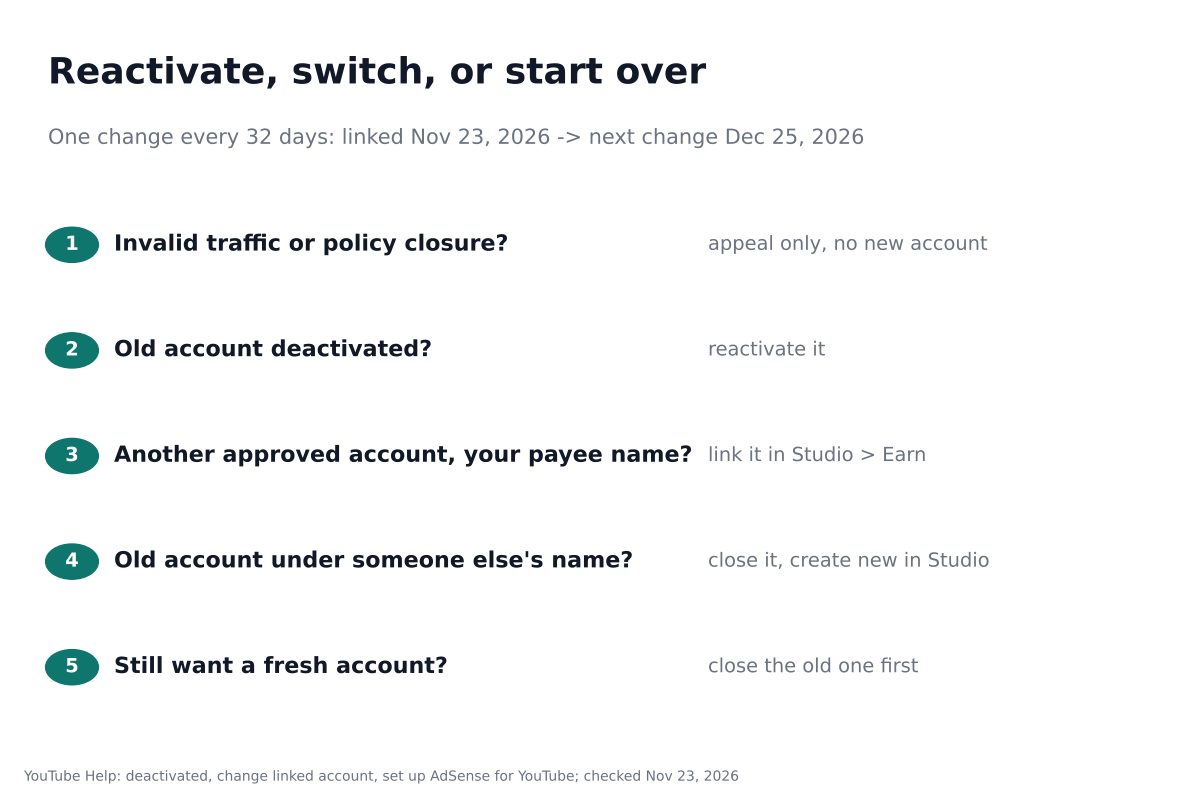
Work through this in order. Stop at the first line that fits.
- Did you get an invalid-traffic or policy closure email? Then don’t open any account. Google says creators disabled for invalid traffic may not open new accounts, and related accounts can be closed too. Your only route is the appeal.
- Is your old account deactivated, not closed by Google? Reactivate it. It keeps the verified address and avoids a new review.
- Do you already own another approved AdSense or AdSense for YouTube account under the same payee name? Link that one. It usually takes minutes.
- Is the old account under a payee name that is no longer you (a former business, a relative)? Ownership can’t be transferred. Close it, wait for the final payment, then create a new account in YouTube Studio.
- Do you want a fresh account even though the old one is under your name? Google allows it only after the older one is closed. Creating it first gets it disapproved as a duplicate and turns monetization off.
- Are you about to create an account at adsense.com? Don’t. Google says new AdSense for YouTube accounts must be created from YouTube Studio, and outside sign-ups get disapproved.
- Did you change the linked account in the last 32 days? You can’t switch again until 32 days have passed. Linked one on November 23, 2026? The next change opens December 25, 2026.
The deactivation page says an eligible channel “can reactivate” or “create a new one”. The setup page adds the condition that matters: one account per payee name, old one closed first. Follow the stricter page.
Link a different AdSense account in YouTube Studio
This applies to channels already approved for the YouTube Partner Program. Here’s the flow as Google describes it :
- Sign in to YouTube Studio and click Earn in the left menu.
- Find the AdSense for YouTube account listed for the channel and click Change.
- Re-enter your password.
- On the AdSense for YouTube screen, sign in with the Google account that owns the account you want, or start a new one (only if the checklist above allows it).
- Confirm the account name at the top, and confirm your channel URL appears under “Your website.”
- Click Accept association. YouTube sends you back to Studio to set monetization preferences.
Linking an existing account usually takes a few minutes. A new account usually needs several days, sometimes 2 to 3 weeks, before it’s approved and associated. YouTube’s own systems can take up to 24 hours to show any change.
That difference is the reason to prefer an account you already have. Every day of pause is a day of earnings you don’t get back.
What happens to your balance
A deactivated account still holds its finalized earnings. AdSense gives you two ways to reach them: reactivate the account, or close it, and a final payment only goes out after closing. On the YouTube side, Google says you can be paid after closing if the balance is above the cancellation threshold and payment holds are cleared.
The numbers, for US-dollar accounts :
| Threshold | Amount | What it controls |
|---|---|---|
| Verification | $10 | Identity and address checks start |
| Payment | $100 | Monthly payment goes out (no holds) |
| Cancellation | $10 | Minimum balance for a final payment on closing |
Source: YouTube Help “Revenue thresholds for AdSense for YouTube,” checked November 23, 2026.
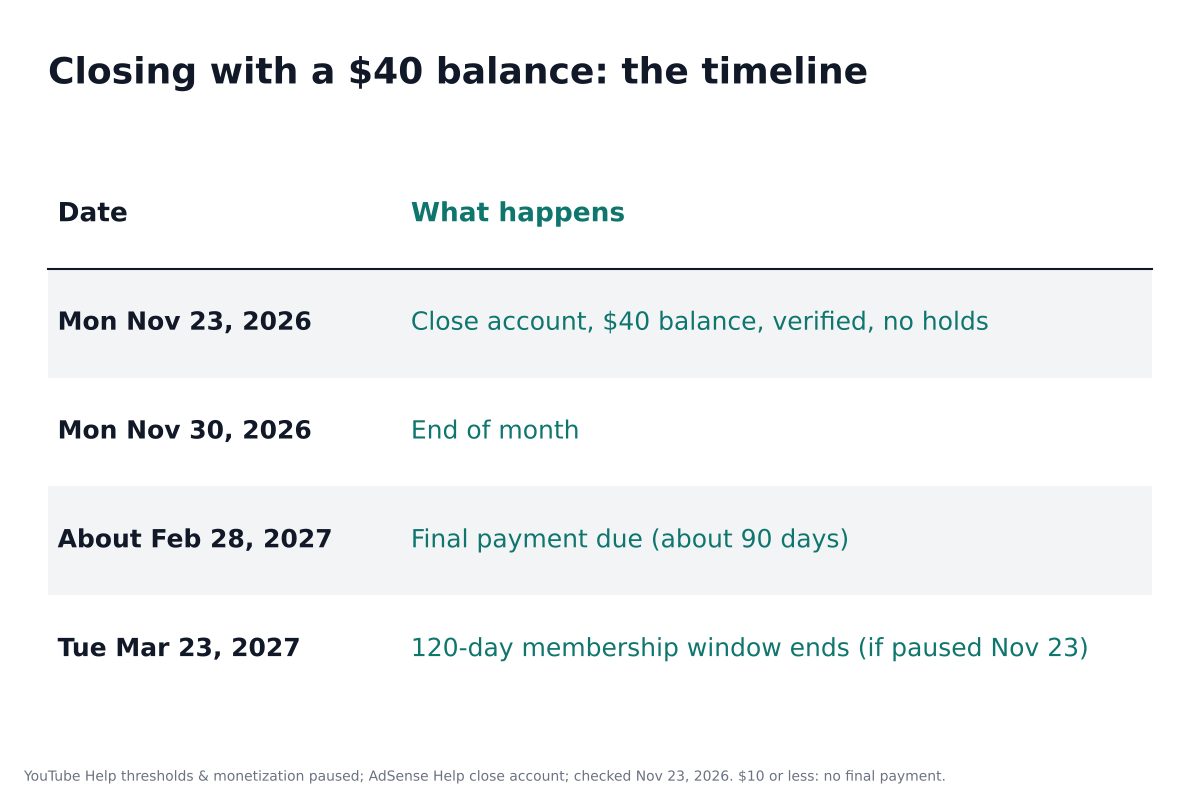
A worked example. Say a deactivated account holds $40 and you close it on November 23, 2026, with the address verified and no holds. That is above the $10 line, so a final payment is due within about 90 days after the end of November, which puts it at about February 28, 2027. At $8, nothing is paid.
If you reactivate instead and the balance is under $100, it keeps waiting for the normal monthly payment like any other balance. The YouTube payment threshold and when YouTube pays you cover that calendar. If the address was never verified, the AdSense PIN guide has the dates.
Before closing, export your reports. Performance reporting goes away once the account is closed.
What you lose while the link is inactive
A pause costs money that doesn’t come back. YouTube says you earn nothing during a pause, including ad, YouTube Premium and membership revenue, and you aren’t paid for that period later.
Ads stop running on your videos, but you can keep uploading. Channel memberships pause and members get notified; you have 120 days to resume monetization before memberships and members are lost. If the pause started November 23, 2026, that window runs to March 23, 2027.
Your channel itself isn’t touched. Google says AdSense deactivation doesn’t change your YouTube channel’s status.
Disabled for invalid traffic: different rules
An invalid-traffic closure isn’t an inactive account, and the reactivation steps above don’t apply. Google treats traffic as invalid when it doesn’t come from real, interested viewers, and a creator can be hit even without intending it.
What Google says happens next :
- A 30-day payment hold while the final amount is worked out.
- A final payment only for revenue not judged invalid.
- An appeal form, with no promise of reinstatement; after a final decision, further appeals may not be considered.
- If reinstated, ads can take up to 48 hours to return, and you may have to re-associate the channel.
Do not open a second account to get around this. Google says creators disabled for invalid traffic may not open new ones and that related accounts can be closed as well. That puts every channel on the account at risk. Google suggests the appeal explain the likely cause and what you changed to prevent it, such as ending any purchased traffic.
Open YouTube Studio, click Earn, and note the status of the AdSense for YouTube account shown there, then match it to the table above and take that row’s next step today.
Frequently asked questions
Why is my AdSense for YouTube account inactive?
Google deactivates an AdSense for YouTube account after 6 months with no ad activity or earnings, or when setup and linking to a channel weren't finished within 6 months. A warning email goes out at the 5-month mark. Accounts that are earning aren't deactivated for inactivity, so a channel that was monetizing up to the message more likely has a duplicate, a closed account or a policy problem.
Do I lose my balance if my AdSense for YouTube account is deactivated?
No. You can still sign in, and the finalized balance stays there. To get it paid out without reactivating, close the account: Google sends a final payment if the balance is above the $10 cancellation threshold, the address is verified and there are no payment holds, usually within about 90 days after the end of the month you close.
Can I create a new AdSense account for YouTube?
Only if you don't already have one under the same payee name, or after you close the old one. Google allows one AdSense or AdSense for YouTube account per payee name and disapproves duplicates. If the old account was disabled for invalid traffic, you may not open a new one at all; the only route is an appeal.
How do I check which AdSense account is linked to my YouTube channel?
In YouTube Studio, open Earn. The AdSense for YouTube section shows the linked account and whether it's approved and active. The AdSense account can sit under a different Google account than your YouTube login, so if the AdSense sign-in shows nothing, try your other Google accounts.
How long does it take to link a different AdSense account to YouTube?
Linking an existing approved account usually takes a few minutes, and YouTube can take up to 24 hours to show the change. A brand-new AdSense for YouTube account usually takes several days to be approved and associated, sometimes 2 to 3 weeks. You can change the linked account once every 32 days.
Sources
- YouTube Help: Your AdSense for YouTube account was deactivated
- YouTube Help: Change your linked AdSense for YouTube account
- AdSense Help: Your AdSense account was deactivated for being inactive
- YouTube Help: Monetization is paused for my channel
- YouTube Help: Set up an AdSense for YouTube account to get paid on YouTube
- YouTube Help: My AdSense for YouTube account was disabled for invalid traffic
- AdSense Help: Close your AdSense for YouTube account
- YouTube Help: Revenue thresholds for AdSense for YouTube
- AdSense Help: Your AdSense account was deactivated because it wasn't set up within 6 months
- AdSense Help: Reactivate a closed AdSense account
- AdSense Help: Access a closed AdSense account
- YouTube Help: Monetization is disabled for my channel
- AdSense Help: Account disabled for invalid traffic
This article is general information based on the author's experience. It is not licensed financial, legal, or tax advice. See the editorial policy.