YouTube AdSense Payment Not Received? Find Where It's Stuck
Missing YouTube AdSense payment? Find the stage it's stuck at: threshold, hold, bank transfer or invalid traffic. Dated timeline, hold checklist and fixes.

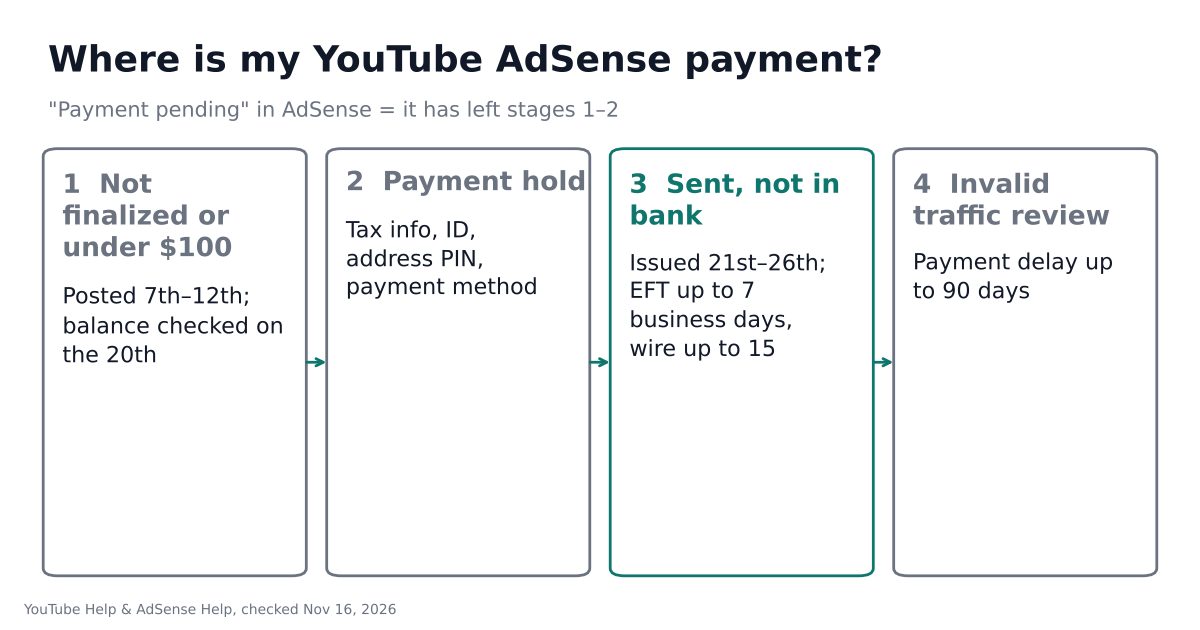
If your YouTube AdSense payment hasn’t arrived, find out whether it ever left Google. Payments are issued between the 21st and 26th. No “Payment pending” line on your AdSense for YouTube Payments page by then means the money is still inside AdSense, under the threshold or behind a hold. If the line is there, count bank days: up to 7 for EFT, up to 15 for a wire.
I grew a YouTube channel past 130,000 subscribers on my own, and the AdSense for YouTube Payments page was a monthly stop. This guide sorts a missing payment into four stages, with Google’s own dates and fixes for each. For the full calendar of pay dates, see when YouTube pays you. This is not licensed tax or financial advice; for withholding, the IRS backup withholding page is the primary source.
Is your payment late yet? The dates for this month
Google runs one cycle per calendar month. Estimated earnings for the previous month are finalized on the 3rd and posted to your AdSense for YouTube balance between the 7th and 12th. On the 20th the balance has to meet the threshold, and every payment info change, including removing a hold, has to be done by then. Payments go out between the 21st and 26th.
Here is that cycle turned into calendar dates for the next four earnings months. The last three columns are the date after which a payment issued on the 26th should already be in your account.
| Earnings month | Posted to balance | 20th cutoff | Issue window | Hyperwallet by | EFT by | Wire by |
|---|---|---|---|---|---|---|
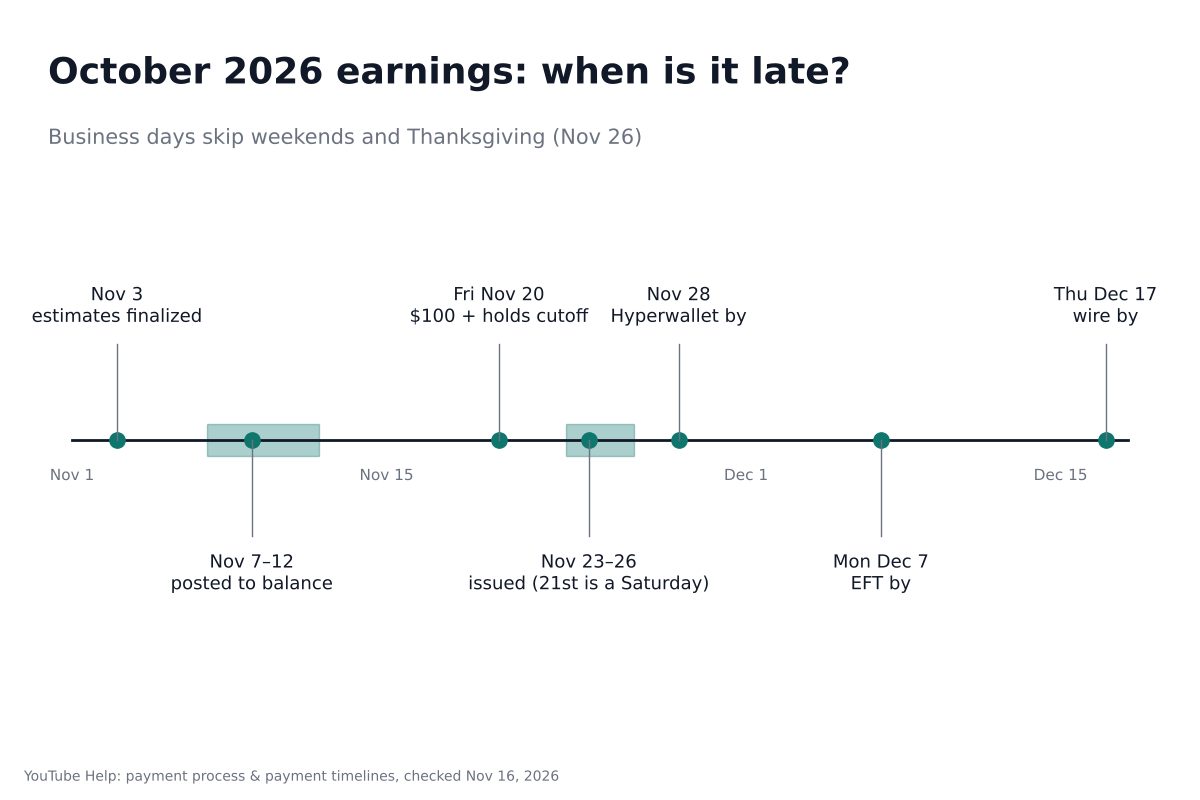
| October 2026 | Nov 7–12 | Fri, Nov 20 | Mon, Nov 23 – Thu, Nov 26 | Nov 28 | Mon, Dec 7 | Thu, Dec 17 |
| November 2026 | Dec 7–12 | Sun, Dec 20 | Mon, Dec 21 – Sat, Dec 26 | Dec 28 | Wed, Jan 6 | Tue, Jan 19 |
| December 2026 | Jan 7–12 | Wed, Jan 20 | Thu, Jan 21 – Tue, Jan 26 | Jan 28 | Thu, Feb 4 | Wed, Feb 17 |
| January 2027 | Feb 7–12 | Sat, Feb 20 | Mon, Feb 22 – Fri, Feb 26 | Feb 28 | Tue, Mar 9 | Fri, Mar 19 |
Source: YouTube Help, “Understand AdSense for YouTube’s payment process” and “Payment timelines for AdSense,” checked November 16, 2026. Arrival dates count from the 26th: Hyperwallet 1–2 days, EFT 7 business days, wire 15 business days, skipping weekends and US bank holidays (Thanksgiving, Christmas, New Year’s Day, Martin Luther King Jr. Day, Presidents’ Day).
Read the first row as of today, November 16. October’s earnings should already be in your balance, because November 12 has passed. If your finalized balance is $100 or more on Friday, November 20, the payment is issued starting Monday, November 23, since the 21st is a Saturday. An EFT that still isn’t in your bank on December 7 is late.
Before those dates, nothing is wrong. Google does not issue payments early for any reason.
Find the stage: what you see and where the money is
Every missing payment sits at one of four points between YouTube Studio and your bank. The Payments page in AdSense for YouTube tells you which one.
| What you see in AdSense for YouTube | Where the money is | Next step |
|---|---|---|
| No line for last month’s earnings, and it’s before the 12th | Still being finalized | Wait until the 12th |
| No earnings line after the 12th | Not transferred from YouTube | Check for an account swap, disapproval or MCN change |
| Earnings posted, balance under $100 on the 20th | Rolled over in your balance | Nothing to fix; it pays when the balance crosses the threshold |
| Red alert or hold banner | Blocked by a hold | Clear it by the 20th (checklist below) |
| “Payment pending” line, no deposit yet | Sent, in transit | Count business days for your method |
| Separate debit line for invalid traffic | Deducted or held for review | Read the invalid traffic notice; reviews can delay payment up to 90 days |
Sources: YouTube Help payment process, payment timelines, “When will I get paid?” troubleshooter and invalid traffic pages, checked November 16, 2026.
The “Payment pending” line is the dividing line. Before it appears, YouTube support is where answers come from. After it appears, start with your bank.
Stage 1: earnings not finalized, or under the payment threshold
The number in YouTube Studio is an estimate. After the month ends, Google adjusts it for invalid traffic, for copyright claims and disputes, for certain campaign types such as cost-per-day buys, and for US taxes on earnings from US viewers. Only the finalized amount counts toward the threshold. If your estimate crossed $100 but the finalized figure didn’t, that month isn’t paid.
The payment threshold is $100 for US-dollar accounts, €70 for euro accounts, £60 for pound accounts and C$100 for Canadian-dollar accounts. A balance under it isn’t lost. It rolls over and keeps accruing. One exception: since October 2026, YouTube has been testing a $20 threshold (or the local equivalent) with a randomly selected group of creators in the US, India and Indonesia. YouTube notifies creators who are in the test; everyone else stays at $100 (how the test works).
A worked example with made-up numbers: October finalizes at $64 and November at $51. On November 20 the balance is $64, so nothing is issued in November. On December 20 it’s $115, and the whole $115 is issued between December 21 and 26.
If you also run a regular AdSense account for a website, it counts separately. Each account has to reach the threshold on its own, and each needs its own payment method.
Money not showing in AdSense at all
When last month’s earnings still aren’t posted after the 12th, Google’s “When will I get paid?” troubleshooter moves to account questions. Did you swap the AdSense for YouTube account linked to your channel? Is that account disapproved? Did the channel recently join an MCN? Was the channel suspended for a monetization policy violation, and if so, was it readmitted within the appeal window? Any yes can explain earnings that never arrived in the balance. Fixing it usually means support, because you can’t move the earnings yourself.
Stage 2: a hold is stopping the payment
Holds are the most common reason a balance over the threshold doesn’t pay. Google lists five kinds: tax, identity, payments, policy compliance and protection. They show up as alerts in your AdSense for YouTube account. A hold you remove after the 20th waits for next month’s cycle.
Holds checklist, in the order Google’s troubleshooter checks them:
- Tax info. Required for every monetizing creator, wherever they live. Path: Payments → Payments info → Manage settings → Payments profile → edit next to “United States tax info” → Manage tax info. Without it, an individual account faces 24% backup withholding on total worldwide earnings.
- Identity verification. Starts once earnings pass the $10 verification threshold. The PIN letter isn’t mailed until this is done.
- Address PIN. A 6-digit PIN arrives by standard international mail, usually in 3–4 weeks, with no tracking. Enter it at Payments → Verification check. You can request a replacement after 3 weeks, up to four replacements in total. You have 4 months from the date the PIN is generated, and 3 wrong entries or a missed deadline demonetizes the channel.
- Payment method. Available once the balance passes the $10 payment method selection threshold. Path: Payments → Payments info → Add payment method. US payment addresses can choose EFT or Hyperwallet, not check or wire. The bank must be in the same country as your payments address. A Hyperwallet account has to be new and activated from Hyperwallet’s email link.
- Self-hold. If you paused payments yourself, remove the hold before the 20th.
- Verification email. If Google emails you from an official alias asking for details such as date of birth, address or ID, reply within 5 business days; payment can’t proceed until you do. Google never asks for bank account details by email.
- Policy or protection review. A policy review usually lifts on its own if the account complies and traffic is valid. A protection review can hold payouts for up to 35 days, with an email when it starts and ends.
- Past-due Google Ads balance. Payment may also be withheld if you owe Google for the Google Ads program.
Sources: YouTube Help pages on payment holds, PIN verification, PIN troubleshooter, thresholds, payment methods and US tax requirements, checked November 16, 2026.
For a first payment, start with item 3. A letter that takes a month to arrive and a 4-month window leave less room than it sounds, especially if you’ve moved.
Tax info: the hold that also takes money
Tax info is the one hold that can cost money and not just time. US creators submit a W-9, and Google doesn’t withhold from US creators with valid tax info. Creators outside the US submit a W-8 form; for individuals that’s the W-8BEN, which the IRS describes as a certificate of foreign status given to the payer. With valid info, withholding applies only to earnings from US viewers, at 0–30% depending on whether a tax treaty applies.
Missing or wrong tax info changes the math. Business accounts outside the US face 30% of US earnings, and US business accounts and individual accounts face 24% of total worldwide earnings. That 24% matches the IRS backup withholding rate.
Submit or fix it by December 10 to claim treaty benefits and possible refunds for the year. Forms expire at the end of the third full calendar year after you sign, so an old form can quietly lapse. For what to set aside once the money lands, see how creators pay taxes or run the YouTube ad revenue tax calculator.
Stage 3: “Payment pending,” but nothing in the bank
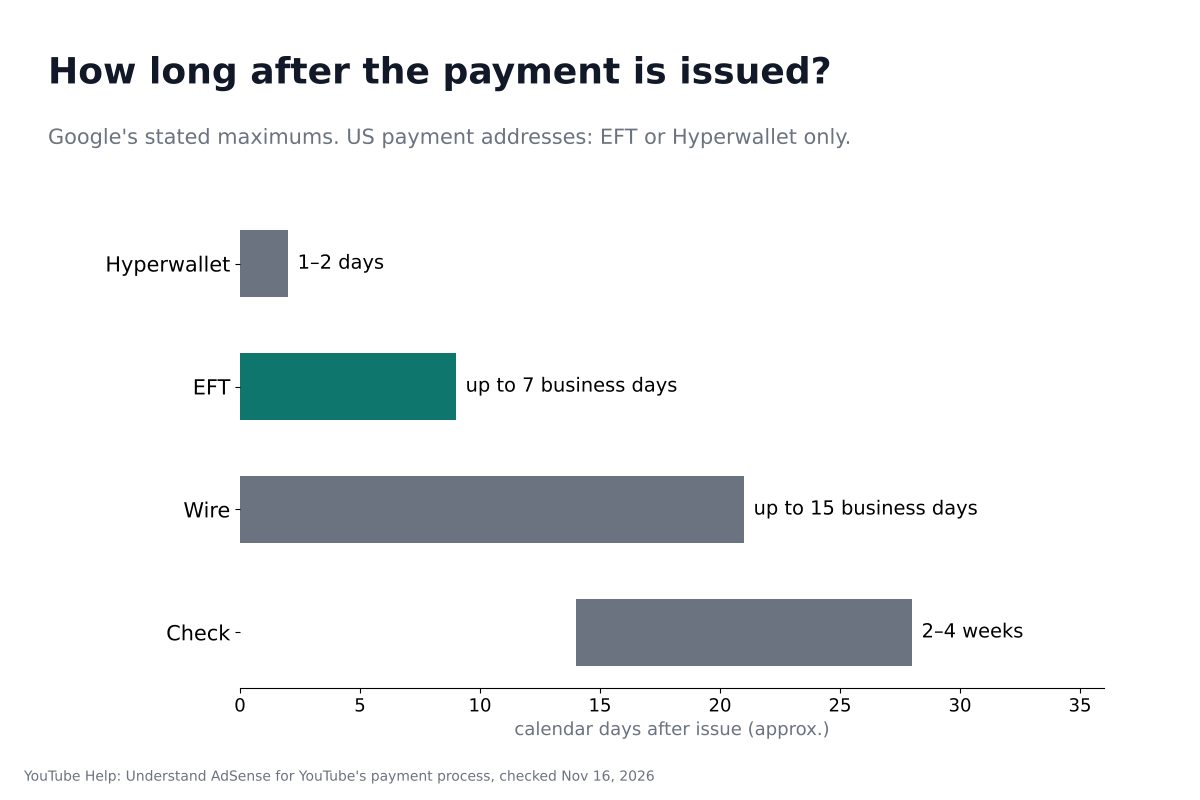
“Payment pending” for an EFT means the earnings were processed and sent to your bank. For a wire, it means the transfer was initiated. From that point, delivery time is set by the method:
| Method | Arrival after issue | First thing to check |
|---|---|---|
| Hyperwallet | 1–2 days | Money in Hyperwallet can’t be moved back to AdSense for YouTube |
| EFT (direct deposit) | Up to 7 business days | No deposit by month end: ask your bank |
| Wire transfer | Up to 15 business days | Bank details must match your payee profile exactly |
| Check | 2–4 weeks | Reissue only after 60 days uncashed |
Source: YouTube Help, “Understand AdSense for YouTube’s payment process” and “Payment timelines for AdSense”; AdSense Help wire transfer FAQ, checked November 16, 2026.
For an EFT, Google’s advice is simple: if the payment hasn’t arrived by the end of the month, follow up with your bank. Before you call, open Payments → Payments info → View transactions and look for the “Automatic payment” entry. AdSense’s EFT troubleshooter also lists the names the deposit can appear under, including “AFS RE GOOGLE,” “Google AdSense Payment” and “Citibank Ireland Financial Services”. Search your statement for each.
If the EFT went to a closed account, it comes back by itself and the money is credited to your balance. It’s reissued once you have a new verified account. If you’re switching banks, add the new account before the 20th so the next cycle uses it. A separate business bank account is worth doing at the same time.
Wires: name mismatch, SWIFT and intermediary banks
Wires fail for reasons an EFT rarely does. AdSense names the usual culprits: a name or details on the bank side that differ from your payee profile, a wrong account number, or no SWIFT code (or no intermediary bank when your bank needs one). Enter the details as your bank holds them, in Latin characters, with no hyphens in the account number. The SWIFT country code has to match your AdSense country. Add intermediary bank details only if your bank requires them.
When a wire is missing, ask your bank before anyone else. After 15 business days with no funds, go to AdSense support, which can send a SWIFT copy (MT103) your bank can use to trace the payment; that investigation can take 2–3 weeks. If the details were wrong, the bank can cancel it, and Google recalls and reissues the payment in about 15 business days. Wires arrive in USD or EUR, and your bank may charge a fee or convert at its own rate.
Stage 4: invalid traffic deductions and reviews
Invalid traffic is any activity that doesn’t come from a real viewer with genuine interest, such as traffic-boosting services or asking viewers to click ads. Google adjusts these earnings before paying when it can. When it catches them after a payment was calculated or sent, the amount is offset from your current or future balance.
That offset shows as a separate debit line on the Payments page in AdSense for YouTube. If the balance dropped under $100 because of it, you’re back in Stage 1 until it rebuilds.
The bigger problem is time. Google says payments may be delayed up to 90 days while traffic and earnings are investigated. Deleting, editing or unlisting the videos involved won’t bring the earnings back. If you bought promotion from a third-party “views” service, stop now; significant invalid traffic can lead to demonetization or a disabled account.
When to contact support, and what to have ready
Contact support when the calendar says the payment is late, not before. Before the 12th, posting is still in progress. Before the 26th, issuing is. After “Payment pending,” your bank comes first, for up to the arrival window of your method.
Have four things ready: the earnings month, a screenshot of the Payments page with any alert, your payment method, and for wires the date of the “Payment pending” line. If you see a red hold alert but never got an email from Google, use the support button inside that alert. Ignore any message that asks for your bank login or account details by email.
If the money is landing fine but the amount feels low, that’s a different question; YouTube RPM by niche covers what a month of views is worth.
Open the Payments page in AdSense for YouTube today, find which of the four stages you’re in, and clear any alert by Friday, November 20, so October’s earnings go out in this month’s 23rd–26th window.
Frequently asked questions
Why haven't I received my YouTube AdSense payment?
Check the Payments page in AdSense for YouTube after the 26th. No "Payment pending" line means the money never left: the finalized balance was under the threshold on the 20th, or a hold (tax info, identity, address PIN, payment method, review) blocked it. A "Payment pending" line means it was issued, and the bank transfer time for your method is still running.
Why is my YouTube payment not showing in my bank account?
If AdSense for YouTube shows "Payment pending," Google has sent it. An EFT can take up to 7 business days and a wire up to 15. For an EFT still missing at the end of the month, Google says to ask your bank. A closed account returns the money to your balance, and wrong or mismatched bank details can get a wire rejected.
Why is my YouTube money not showing in AdSense?
Last month's earnings are posted to the AdSense for YouTube balance between the 7th and 12th, so before the 12th that's normal. After that, Google's troubleshooter points to account problems: a swapped or disapproved AdSense for YouTube account, or a recent move to an MCN.
What date does YouTube AdSense pay?
Payments are issued between the 21st and 26th of the month after the earnings month. If the 21st is a weekend or holiday, EFT and wire payments may go out on the first business day after it. October 2026 earnings, for example, are issued from Monday, November 23.
What is the AdSense payment threshold for YouTube?
$100 for accounts paid in US dollars, €70 for euro, £60 for pounds and C$100 for Canadian dollars. The finalized balance must be at or above it on the 20th. If it isn't, the balance rolls over to the next month.
Sources
- YouTube Help: Understand AdSense for YouTube's payment process
- YouTube Help: Payment timelines for AdSense
- YouTube Help: When will I get paid? (troubleshooter)
- YouTube Help: Fix a payment hold on your AdSense for YouTube account
- YouTube Help: Verify your address with PIN in AdSense for YouTube
- YouTube Help: Personal Identification Number (PIN) troubleshooter
- YouTube Help: Revenue thresholds for AdSense for YouTube
- YouTube Help: Add your payment method for AdSense for YouTube
- YouTube Help: How to get paid on YouTube
- YouTube Help: U.S. tax requirements for YouTube earnings
- YouTube Help: Invalid traffic on your videos
- AdSense Help: Wire transfer payments FAQ
- AdSense Help: EFT payment troubleshooter
- IRS: Here's what taxpayers should know about backup withholding
- IRS: About Form W-8 BEN
This article is general information based on the author's experience. It is not licensed financial, legal, or tax advice. See the editorial policy.