YouTube AdSense PIN Not Received? Dates, Limits and Next Steps
YouTube AdSense PIN not here? When Google mails it, the 3-week resend rule, the 4-replacement limit and the 4-month deadline, with a dated calendar and checklist.

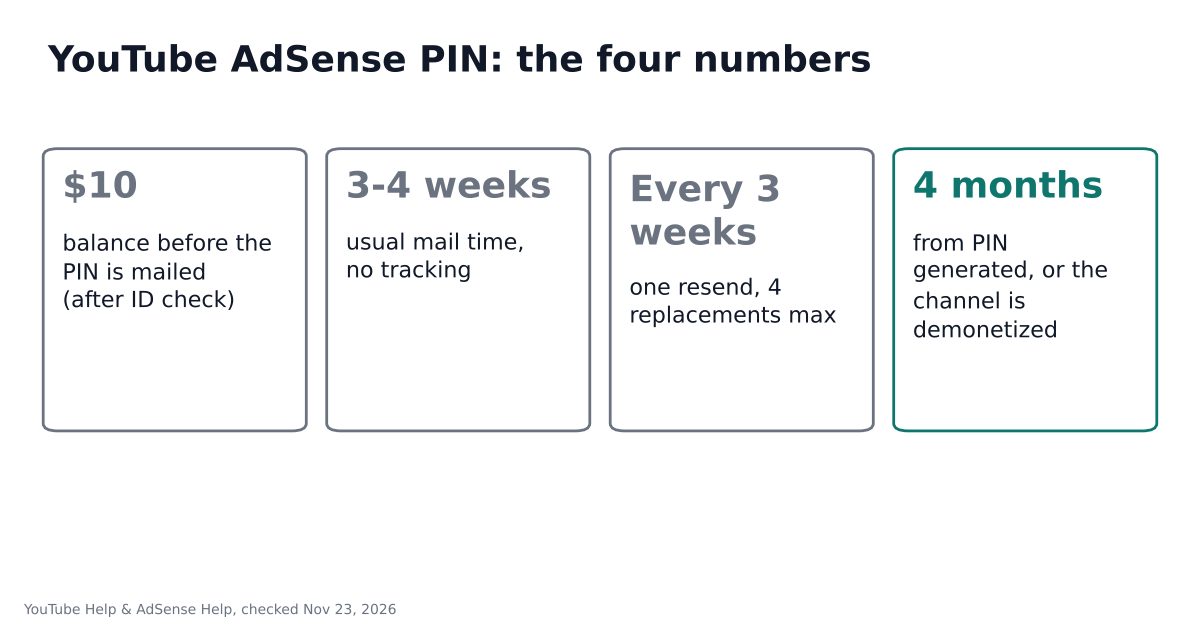
If your YouTube AdSense PIN hasn’t arrived, it is usually not late yet. Google mails the 6-digit PIN after your balance reaches $10 and your identity is verified, and the letter takes 3 to 4 weeks. After 3 weeks you can request a replacement, once every 3 weeks, up to four times. The deadline to enter it is 4 months after the PIN was generated.
I grew a YouTube channel past 130,000 subscribers on my own, and this guide turns Google’s PIN rules into dates you can put on a calendar. This is not licensed financial or legal advice; Google’s AdSense address verification page is the primary source. If your problem is a payment that was issued but never reached the bank, see why a YouTube AdSense payment wasn’t received instead.
When Google sends the PIN letter
Nothing is mailed until two things are true. Your AdSense for YouTube balance has reached the verification threshold, which is $10 for US-dollar accounts and the $10 equivalent elsewhere. And your identity verification is done.
Identity comes first. Google asks for it once you cross $10, and the PIN is generated only after that check passes. If your Verification check page still asks for ID, no letter exists yet, and waiting at the mailbox won’t change that.
Open AdSense for YouTube, go to Payments, then Verification check. That page shows whether identity is still outstanding and whether a PIN has been generated, with its date. Write that date down. Every deadline in this article counts from it.
Some accounts never get a letter at all. YouTube Help says online verification may be available depending on your location, and AdSense Help says some publishers who completed online identity verification don’t need address verification.
How long the letter takes
The letter goes out as ordinary international post, and it carries no tracking number. YouTube Help says it usually arrives in 3 to 4 weeks.
Google’s own pages don’t agree to the week. One AdSense page says 2 to 4 weeks, another says 3 weeks, and the troubleshooting FAQ says mail can take up to 3 weeks. This guide follows the YouTube page, since it is the one written for AdSense for YouTube accounts.
The number that matters is the same everywhere: 3 weeks. Before that, a missing PIN is normal. After it, you’re allowed to ask for another.
Why your PIN hasn’t arrived
Google lists five reasons a PIN doesn’t show up. Each one has a different fix, and only one of them is fixed by waiting.
| Reason Google lists | How to tell | What to do |
|---|---|---|
| Balance below the $10 verification threshold | Balance on the AdSense for YouTube home page is under $10 | Nothing; the PIN is generated after you cross it |
| Identity verification incomplete | Verification check still asks for ID | Submit ID under Payments, Verification check |
| Payments address linked to fraudulent activity | Google flags it in your AdSense account | Change to a different valid address, verify it, then request a PIN |
| Address can’t receive standard mail | Unit number missing, or mail returned | Fix the address, wait 3 weeks from the last mailing, request a replacement |
| Last PIN request less than 3 weeks ago | Resend PIN shows a “PIN already requested” message | Wait until 3 weeks have passed |
Sources: YouTube Help “Verify your address with PIN” and AdSense Help “Fix problems with AdSense address verification (PIN),” checked November 23, 2026.
If the first two rows apply, a replacement PIN won’t help. There is nothing to replace yet.
The PIN calendar: from generated date to deadline
Here is the full sequence, assuming you request each replacement on the first day Google allows it. Google permits one PIN request every 3 weeks and four replacements in total, and the deadline falls 4 months after the PIN was generated.
The example uses a PIN generated on Monday, November 23, 2026.
| Step | Weeks after PIN generated | Example date |
|---|---|---|
| PIN generated and mailed | 0 | Mon, Nov 23, 2026 |
| Usual arrival window | 3–4 | Dec 14 – Dec 21 |
| Replacement 1 allowed | 3 | Mon, Dec 14 |
| Replacement 2 allowed | 6 | Mon, Jan 4, 2027 |
| Replacement 3 allowed | 9 | Mon, Jan 25 |
| Replacement 4 allowed (the last one) | 12 | Mon, Feb 15 |
| 4th replacement missing: use the PIN troubleshooter | 15 | Mon, Mar 8 |
| 4-month verification deadline | about 17 | Tue, Mar 23 |
Sources: YouTube Help PIN page and PIN troubleshooter; AdSense Help replacement PIN and PIN problems pages, checked November 23, 2026. Dates computed from the 3-week interval; your own dates start from the generated date on your Verification check page.
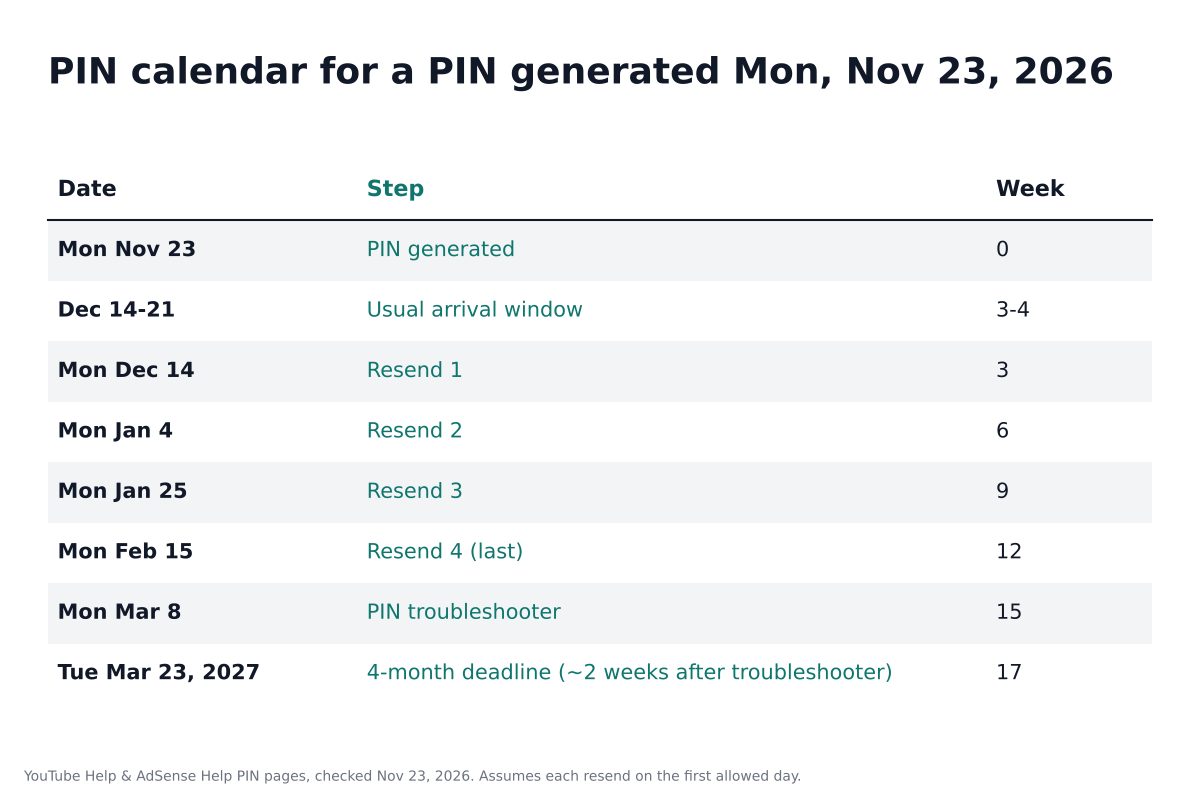
Look at the last two rows. Even if you use every replacement on time, you reach the troubleshooter with about two weeks left before the deadline. Every week you wait past a 3-week mark comes straight out of that buffer.
Two details Google’s pages leave open. They don’t say whether a replacement restarts the 4-month clock, and since a replacement is an exact duplicate of the original PIN, plan as if it doesn’t. They also don’t say what happens at the deadline for creators already talking to support, so start that conversation early, not on day 120.
Before you click Resend PIN: a checklist
A replacement goes to whatever address is on file. If that address is the reason the first letter failed, the second one fails too. Run this checklist each time before you request a replacement :
- Verification check shows identity as verified and a PIN as generated, with a date.
- At least 3 weeks have passed since the last PIN request.
- The address is in the same country or territory you chose when you signed up; Google won’t accept one in another country.
- Street line, unit or apartment number, and ZIP or postal code are all filled in, and the address can take standard mail.
- Your post office isn’t holding or forwarding mail for that address.
- You are signed in as a payments admin; only those users can change the payments address.
- You’ve logged today’s date as replacement 1, 2, 3 or 4, so you know how many are left.
Google also recommends entering the address in local-language characters. That matters most if your payments address is outside the US.
Keep the log. If you end up asking support for more time, the dates of each request are the first thing worth having.
Changing your address while a PIN is in the mail
A PIN mailed before you changed the address went to the old one. If the Verification check page shows a different address from your current payments address, that’s why.
Update the address first. Then wait until 3 weeks after the last PIN was mailed and request a replacement; it goes to the new address. When you click Resend PIN after the 3-week mark, Google shows a dialog to confirm or edit the address before it sends.
If the old letter shows up anyway, use it. Google generates one PIN per account, and every replacement carries the same 6 digits, so whichever copy arrives first works.
Don’t move the account to a borrowed, virtual or out-of-country address to get a letter faster. The address has to be a real mailing address in your sign-up country, and an address flagged for fraud has to be replaced with a different valid one.
What happens to your payments while the PIN is pending
An unverified address puts a payment hold on the account. YouTube Help lists “You haven’t verified your address” as a hold, removed by entering the PIN. AdSense Help says Google verifies the payments address before it sends any payment.
Verifying the address doesn’t trigger a payment by itself. Your balance still has to be at least $100, the payment threshold for US-dollar accounts, and there can be no other holds.
The calendar date matters too. Changes to payment info, including removing a hold, must be done on or before the 20th to count for that month, and payments are issued from the 21st to the 26th. A balance under the threshold on the 20th rolls over to the next month.
| You enter the PIN on | Balance on the 20th | First possible payment |
|---|---|---|
| Tue, Jan 12, 2027 | $100 or more, no other holds | Jan 21–26, 2027 |
| Fri, Jan 22, 2027 | $100 or more, no other holds | Feb 21–26, 2027 (the 21st is a Sunday, so it may go out Mon, Feb 22) |
| Any day | Under $100 | The month the balance reaches $100 by the 20th |
Source: YouTube Help “Understand AdSense for YouTube’s payment process” and “Revenue thresholds for AdSense for YouTube,” checked November 23, 2026.
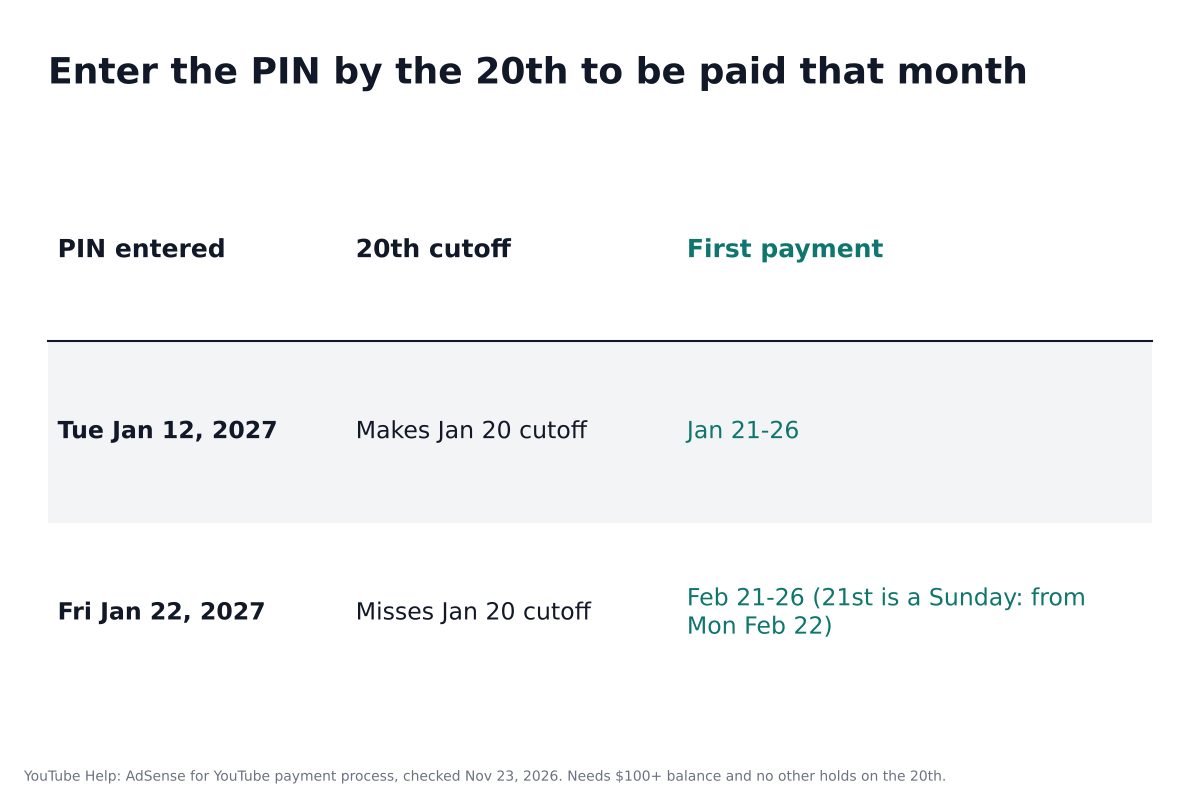
Enter the PIN the day it arrives. Ten days can cost you a month. For the full monthly schedule, see when YouTube pays you, and for how the $100 line works, the YouTube payment threshold.
After the 4th replacement: the troubleshooter
Four replacements is the maximum. If the 4th still hasn’t arrived 3 weeks after you requested it, Google’s next step is the PIN troubleshooter, not a fifth resend.
The YouTube PIN troubleshooter walks through the same checks: balance above $10, the PIN entered under Payments, then Verification check, whether ads are still showing, and how many replacements you’ve used. If it doesn’t resolve things, YouTube points you to the YouTube Help Community.
Google’s public pages don’t promise a document upload or any other fallback after the 4th PIN. What they do say is that online verification exists in some locations, and AdSense Help says to contact AdSense support to extend the verification timeline. If the troubleshooter offers you another option, use it. If it doesn’t, ask support for an extension before the 4-month date.
Skip anything that promises to verify AdSense “without a PIN” through edited bank statements, a friend’s address or a second account. Those break AdSense rules and put the channel’s monetization at risk, which is the exact thing you are trying to protect.
Wrong PIN or missed deadline
Three wrong entries fail address verification. YouTube Help says the channel is demonetized; AdSense Help words it as ads no longer showing. Requesting a replacement PIN resets the attempt limit.
Type the PIN exactly as printed on the mailer. It’s 6 digits, and it is not your publisher ID, which is the 16-digit number that starts with “pub-”.
Missing the 4-month window has the same result: YouTube Help says the channel is demonetized if the address isn’t verified by then. AdSense Help’s fix is to contact AdSense support to extend the timeline. YouTube’s page doesn’t mention extensions, so ask well before the date rather than after.
Taxes are a separate track. A verified address doesn’t settle your US tax info, which the thresholds page sets at $0 of earnings; how creators pay taxes covers what comes after the money lands. More money guides are in Money Ops.
Open Payments, then Verification check, today. Copy the PIN generated date into your calendar and add four reminders 3, 6, 9 and 12 weeks later, plus one for 4 months out.
Frequently asked questions
How long does the AdSense PIN take to arrive for YouTube?
YouTube Help says the letter usually takes 3 to 4 weeks. It travels by international standard mail with no tracking number, so there is nothing to follow while it's in transit. AdSense Help gives slightly different figures (2 to 4 weeks on one page, 3 weeks on another), but every Google page agrees you can ask for a replacement once 3 weeks have passed.
How many times can I request an AdSense PIN?
Four replacement PINs, on top of the original. Google's PIN troubleshooter calls four the maximum, and you can only request one every 3 weeks. If the 4th replacement still hasn't arrived 3 weeks after you requested it, Google sends you to the PIN troubleshooter instead of another resend.
Can I verify my YouTube AdSense address without a PIN?
Only if Google offers it to your account. YouTube Help says that depending on your location you may be able to use online verification, and AdSense Help says some accounts that passed online identity verification don't need the PIN at all. Check Payments, then Verification check. There is no allowed workaround beyond what that page offers.
What happens if I don't enter the AdSense PIN within 4 months?
YouTube Help says your channel will be demonetized if the payments address isn't verified within 4 months of the date the PIN was generated. AdSense Help says to contact AdSense support to extend the timeline, so do that before the deadline, not after.
Can I change my address after the PIN was sent?
Yes, but the PIN already mailed goes to the old address. Update the payments address, then wait until 3 weeks after the last PIN was mailed and request a replacement, which goes to the new address. The new address must be in the same country you chose when you signed up and must accept standard mail.
Sources
- YouTube Help: Verify your address with PIN in AdSense for YouTube
- YouTube Help: Personal Identification Number (PIN) troubleshooter
- AdSense Help: Fix problems with AdSense address verification (PIN)
- AdSense Help: Problems with your PIN (request a replacement PIN)
- AdSense Help: Address verification (PIN)
- YouTube Help: Revenue thresholds for AdSense for YouTube
- YouTube Help: Fix a payment hold on your AdSense for YouTube account
- YouTube Help: Understand AdSense for YouTube's payment process
This article is general information based on the author's experience. It is not licensed financial, legal, or tax advice. See the editorial policy.