Final Cut Pro Update Not Showing Up? Fixes for Version 13.0
Final Cut Pro 13.0 not in the App Store? It needs macOS 26.6. Match what the store shows to the cause: old macOS, wrong Apple Account, unadopted copy, or edition.

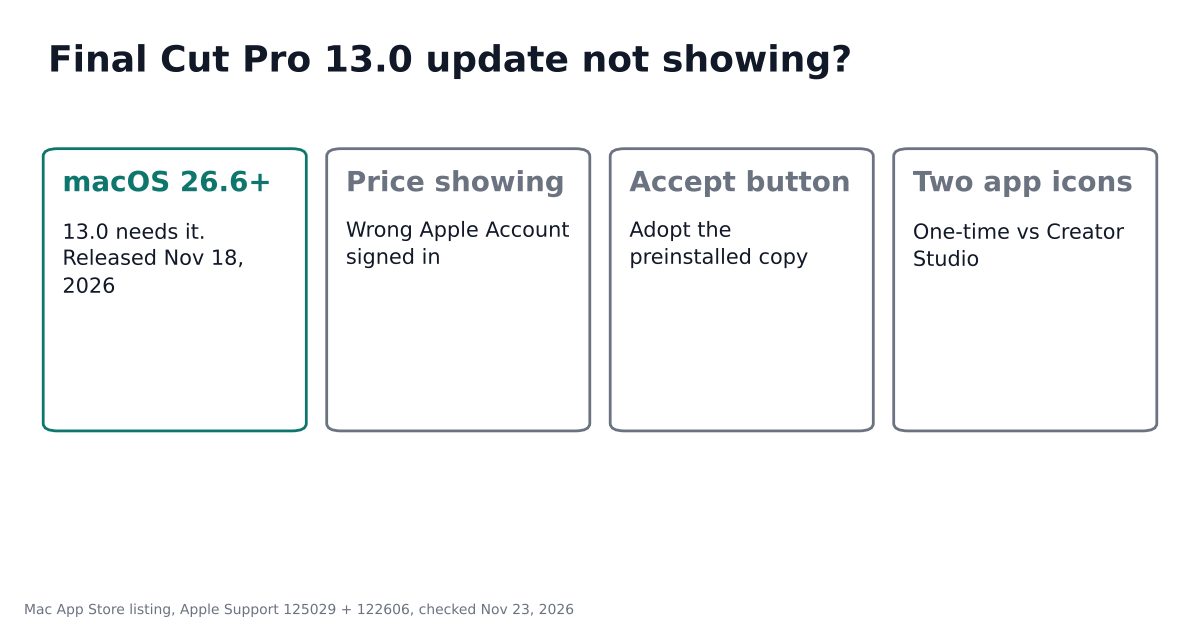
Final Cut Pro 13.0 came out on November 18, 2026, and the Mac App Store listing says it needs macOS 26.6 or later. If the update is not showing up, the cause is almost always one of four things. Your macOS is older than 26.6, you are signed in with an Apple Account that did not buy the app, a preinstalled or education copy was never adopted, or you are looking at the other edition (one-time purchase vs Apple Creator Studio).
Start with what the App Store shows you. Each screen points to a different cause.
Match what the App Store shows to the cause
Apple spreads its update guidance across four support articles. Here it is in one place, keyed to what is actually on your screen. One row (the Open button) comes from user reports, and it says so.
Symptom-to-cause table built from Apple’s Pro Apps support articles:
| What you see | Apple-documented cause | What to do |
|---|---|---|
| No Final Cut Pro entry in Updates | macOS too old for 13.0, or the list is stale | Check macOS is 26.6+, then press Command-R in Updates |
| A price ($299.99) instead of Update or Open | Signed in to the wrong Apple Account | Sign in with the account that bought it |
| “Open” on the Final Cut Pro page | Not named by Apple; users tie it to macOS below 26.6 | Check macOS version first |
| Accept button on your Account page | Preinstalled copy never adopted | Click Accept, then Updates |
| Education bundle apps missing | Redemption codes not redeemed | Redeem the five codes from Apple’s emails |
| Two Final Cut Pro icons | One-time and Creator Studio editions both installed | Update each one; features differ |
Sources: Apple Support 122606, 122604, 101869, 125029 and the Mac App Store listing, checked November 23, 2026.
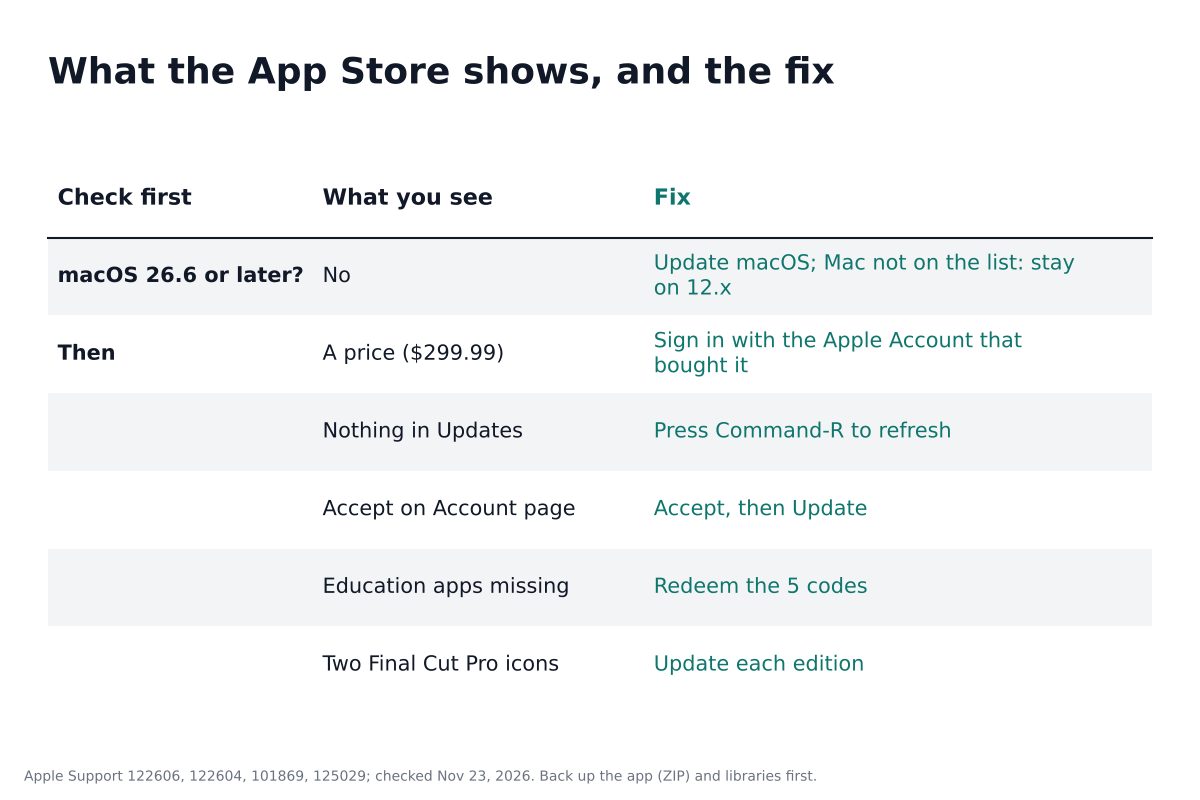
The Command-R tip comes straight from Apple. If you are signed in to the right account and the Updates section still shows nothing for an app you own, Apple says to press Command-R to refresh the list. Do that before you reinstall anything.
Check macOS first: Final Cut Pro 13.0 needs 26.6
This is the cause I would rule out first, because no amount of signing out and back in fixes it.
Click the Apple menu, then About This Mac, and read the version number. If it starts with 15 or with 26.5 or lower, the App Store will not offer 13.0. Apple’s update article says it plainly: your macOS version might not be compatible with the latest version of the app, and some Macs cannot run the latest macOS at all.
Final Cut Pro 13.0 requirements, collected from Apple’s own pages:
| Requirement | Value | Where Apple states it |
|---|---|---|
| Minimum macOS to install 13.0 | macOS 26.6 or later | Mac App Store listing; Creator Studio support article (Nov 18, 2026) |
| Memory | 8 GB (16 GB recommended) | Mac App Store listing |
| Free disk space | 7.2 GB | Mac App Store listing |
| Graphics | Metal-capable card (Intel Macs only) | Mac App Store listing |
| Captions in the 23 new languages | macOS 27 or later | 13.0 release notes |
| Cinematic mode editing from Final Cut Camera | macOS 27 or later | 13.0 notes in the App Store |
| Some features | Mac with Apple silicon | Mac App Store listing |
Source: Apple release notes 102825, Mac App Store Final Cut Pro listing and Apple Support 125029, checked November 23, 2026.
One trap: Apple’s Final Cut Pro specs page and the Creator Studio marketing page still say macOS 15.6. Those pages are undated and older than 13.0. The App Store listing and the support article published on release day both say 26.6, and the App Store is the thing deciding whether you see the update.
Can your Mac get to 26.6? macOS 26 is Tahoe. Apple’s compatibility list covers Apple silicon Macs plus four Intel models: the 16-inch MacBook Pro (2019), the 13-inch MacBook Pro (2020, four Thunderbolt 3 ports), the 27-inch iMac (2020) and the Mac Pro (2019). If your Mac is not on that list, it cannot run 13.0. Stay on the version you have and keep your libraries backed up.
If your Mac is on the list, update macOS in System Settings, restart, then go back to the App Store and refresh Updates.
Sign in with the Apple Account that bought it
A price button is the clearest symptom on this page. Apple says that if you see a price next to Final Cut Pro instead of Update or Open, you are signed in to the wrong Apple Account on that Mac.
This happens more than people expect. You bought Final Cut Pro years ago on an old Apple ID, then set up a new Mac with a different one. The App Store only offers updates to the account that owns the purchase.
The fix: in the App Store, click your name at the bottom of the sidebar, sign out, and sign in with the account that bought the app. Apple’s help page also notes that if you have several Apple Accounts, purchases can be consolidated into one. Once you are on the right account, updates are included with the purchase. You do not pay again for 13.0.
Preinstalled, education and Creator Studio copies
Three ways of owning Final Cut Pro do not behave like a plain App Store purchase.
Preinstalled on a new Mac. If Final Cut Pro came on the Mac when you bought it, Apple says you have to adopt it before it gets updates. Open the App Store, click your name at the bottom of the sidebar, and look at the top of the Account page. If an Accept button sits there with a list of apps, click it, sign in again if asked, then go to Updates and click Update. If an error says the app was bought with a different Apple Account, Apple’s adopt article says to sign in with the account originally used to adopt the apps.
Pro Apps Bundle for Education. The bundle arrives as five content redemption codes by email. Until those codes are redeemed in the Mac App Store, the apps are not tied to your account, and updates will not appear.
Apple Creator Studio. This is Apple’s subscription that includes Final Cut Pro, at $12.99 a month or $129 a year in the US after a one-month free trial for new subscribers. Apple’s Creator Studio article says the subscription apps have their own icons and that both versions can be installed on the same Mac. So two things follow. First, updating the one-time app does nothing for the Creator Studio app, and the reverse. Second, if you see a subscribe prompt inside Final Cut Pro even though you already pay, Apple’s 13.0 user guide points to the Already Subscribed? option.
Prices: Apple Creator Studio page, checked November 23, 2026.
Back up before you click Update
I edit my YouTube videos alone in Final Cut Pro. If an update breaks a project in the middle of an edit, there is nobody to hand it to, which is why this step is the one I would not skip.
Apple’s release notes open with the same advice: check the system requirements, then back up your current Final Cut Pro app and your libraries before installing any update. Apple’s update article spells out how.
Pre-update checklist (from Apple Support 122606 and 119959):
- Note your current version: select Final Cut Pro in Applications and choose Get Info.
- Compress the app into a ZIP, put it in a folder named with the version, and copy it to external storage.
- Back up every library you are working in, to a drive Final Cut Pro is not using.
- Turn off automatic app and macOS updates in System Settings, General, Software Update, so nothing updates before you are ready.
- Check that your plug-ins and any external video hardware support 13.0.
The library backup matters more than the app backup. Apple’s after-update article says that if you need to go back, you revert to the backed-up app and restore a library backup that has not been opened in the new version. Once a library is opened in 13.0, treat that copy as a 13.0 library.
If 13.0 does misbehave, the crash checklist for Final Cut Pro and the steps for a damaged Final Cut Pro library both start from these backups.
What changed in 13.0 for a one-person YouTube workflow
Apple’s 13.0 notes are split in two: features for both editions, and features only in Final Cut Pro in Apple Creator Studio. That split explains a common complaint: you updated, and the MotionVFX effects are nowhere. They are not in the one-time app.
Edition split from the 13.0 release notes, with a note on what it means if you edit YouTube videos alone (the last column is our reading, not Apple’s):
| 13.0 change | One-time purchase | Creator Studio | For a solo YouTube edit |
|---|---|---|---|
| Disconnect clips from the primary storyline | Yes | Yes | Music beds and lower thirds stay put while you trim |
| More precise keyframe easing | Yes | Yes | Smoother zooms and title moves |
| Natural Motion Blur (shutter angle slider) | Yes | Yes | Helps speed-ramped B-roll |
| Captions and transcript search in 23 new languages | Yes (macOS 27) | Yes (macOS 27) | Only matters if you caption in other languages |
| SRT as default caption format | Yes | Yes | One less format change before exporting captions |
| Two-finger viewer zoom and pan | Yes | Yes | Faster framing checks on a laptop |
| Built-in MotionVFX effects, titles, transitions | No | Yes | Effects and titles without separate packs |
| Content Hub stock media | No | Yes | Stock B-roll inside the app |
| In-app image generation | No | Yes | Thumbnails and inserts without leaving the edit |
Source: Apple Final Cut Pro release notes (13.0, November 18, 2026), checked November 23, 2026.
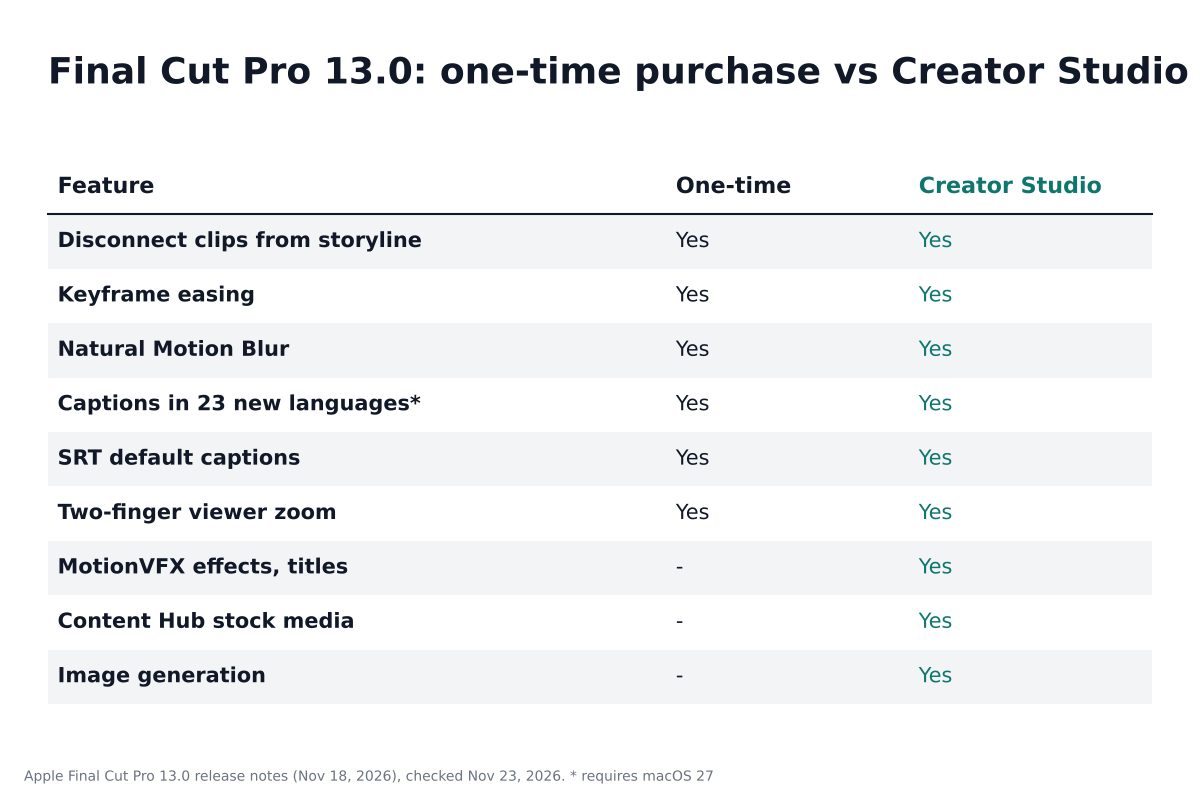
If you only need the timeline changes, the one-time app gets them. If the MotionVFX library is the reason you wanted 13.0, that is a subscription decision, not an update problem. The 13.0 notes list no export changes, so the Final Cut Pro export settings for YouTube still apply.
If the update still won’t show
Apple’s own fixes end at Command-R, the right account, macOS, and adopting the app. Past that point the advice comes from users on Apple’s community forums, so treat it as reported, not documented.
Two workarounds come up again and again. Some users say the Update button appears on the Final Cut Pro product page (search for it in the App Store) even when the Updates list is empty. Others move the app to the Trash, without emptying it, and download it again from the Purchased list in their account, which installs the current version their Mac can run.
Do the Trash route only after the ZIP backup from the checklist above. If Final Cut Pro was ever installed from somewhere other than the Mac App Store under your account, the App Store has no purchase to update, and Apple’s answer in that case is the account and adoption steps, not a reinstall.
Open About This Mac now. If it reads 26.6 or later, sign in with the Apple Account that bought Final Cut Pro, open Updates and press Command-R.
Frequently asked questions
What is the latest version of Final Cut Pro?
Final Cut Pro 13.0, released by Apple on November 18, 2026. The previous versions were 12.4 (September 29, 2026) and 12.3 (June 30, 2026). The Mac App Store listing for 13.0 says it requires macOS 26.6 or later, and some features, such as captions in the 23 newly supported languages, need macOS 27.
Is Final Cut Pro 13 a free update if I already own it?
Yes, if you bought the one-time version from the Mac App Store. Apple's Pro Apps help page says a purchase includes updates. Sign in to the App Store with the Apple Account that bought it and update from there. If the store shows a price instead of Update, Apple says you are signed in with the wrong Apple Account.
What macOS do I need for Final Cut Pro 13?
macOS 26.6 or later, according to the Mac App Store listing and Apple's Creator Studio support article published November 18, 2026. Apple's older specs page still says macOS 15.6; follow the newer pages. Captions in the 23 new languages need macOS 27, and some features need a Mac with Apple silicon.
Why does the App Store say Open instead of Update for Final Cut Pro?
Usually because the App Store thinks the copy you have is the newest one it can offer this Mac, most often because macOS is older than 26.6. Check your macOS version, update it if your Mac is supported, then reopen the App Store, click Updates and press Command-R to refresh the list, as Apple suggests.
Can I go back to Final Cut Pro 12 after updating to 13?
Only if you backed up the 12.x app before updating. Apple's after-update article says to revert to the backed-up app, and for libraries, to restore a backup that has not been opened in the new version. A library you have already opened in 13.0 is not the copy to go back with.
Sources
- Apple Support — Final Cut Pro release notes (13.0 released November 18, 2026)
- Mac App Store — Final Cut Pro listing (version 13.0, compatibility)
- Apple Support — About Apple Creator Studio (published November 18, 2026)
- Apple Support — Update Final Cut Pro, Logic Pro, Pixelmator Pro, or other Pro Apps (published January 9, 2026)
- Apple Support — Get help with installing and updating Pro Apps on your Mac
- Apple Support — Adopt preinstalled Pro Apps on your Mac
- Apple Support — If Final Cut Pro doesn't work on your Mac after an update
- Apple Support — macOS Tahoe is compatible with these computers (September 14, 2026)
- Apple — Final Cut Pro technical specifications
- Apple — Subscribe to Apple Creator Studio from Final Cut Pro for Mac (User Guide 13.0)
- Apple — Apple Creator Studio
This article is general information based on the author's experience. It is not licensed financial, legal, or tax advice. See the editorial policy.